Sunlight readable displays are often specified too late in an OEM project. In our pre-sales conversations, buyers sometimes compare only nits, call optical bonding “extra brightness,” or simply state “outdoor use.” Those shortcuts can lead to glare, overheating, excess power draw, and expensive enclosure redesigns.
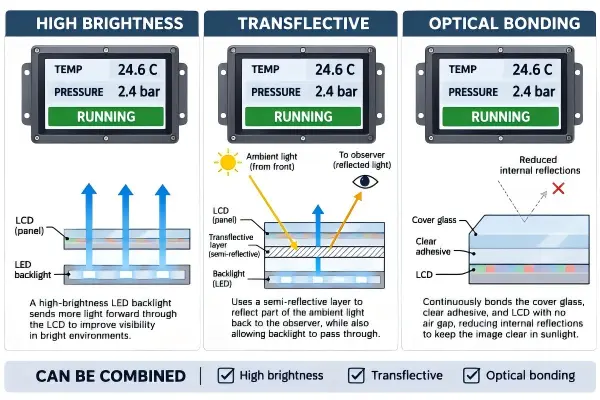
A sunlight readable display is selected by matching the LCD, cover glass, bonding method, brightness, mounting angle, shading, content, and thermal design to the real installation environment. High-brightness LCDs add emitted light, transflective LCDs use ambient light differently, and optical bonding reduces reflections and improves perceived contrast. These approaches can also be combined when application requirements justify it.
The better question is not, “How many nits do we need?” We encourage OEM buyers to ask what light reaches the screen, where users stand, what information they must read, and how the equipment manages heat. Those answers make the display selection far more defensible.
What Makes a Display Sunlight Readable?
A display may look excellent in a meeting room but become difficult to use outdoors. Direct sun, reflected sky, angled viewing, and glossy cover glass can all reduce visibility. If an operator cannot read a critical message quickly, the nominal brightness figure has limited value.
Sunlight readable performance depends on perceived contrast at the user’s viewing position, not brightness alone. OEMs should evaluate ambient light, screen orientation, cover-glass reflections, enclosure shading, viewing distance, content design, and operating temperature before choosing a high-brightness, transflective, or optically bonded display.
Brightness Is Only One Part of Readability
Brightness is measured in cd/m², commonly called nits. A higher-nit panel can produce more emitted light, which can help the image compete with bright ambient conditions. However, emitted light does not eliminate every visibility problem.
For example, a screen can have a high brightness specification and still appear washed out when a user sees a reflection of the sky, nearby windows, their own clothing, or overhead lighting. A poor installation angle can turn the cover glass into a mirror.
In our discussions with equipment manufacturers, we usually separate the problem into two categories:
- The display image is not bright enough.
- Reflections and glare are reducing contrast.
These issues often occur together, but they require different solutions.
Installation Conditions Change the Requirement
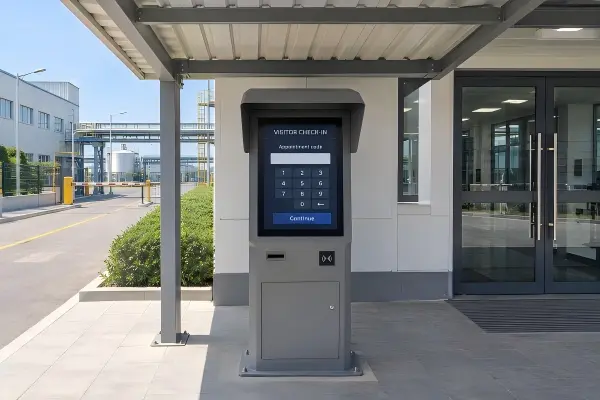
An outdoor ticketing terminal under a canopy has a different display requirement from an unshaded roadside interface. Likewise, a screen used for a few seconds to select a menu differs from a control interface that must show alarms, measurements, or safety-related instructions.
We recommend that buyers document:
| Selection factor | Why it matters |
|---|---|
| Direct or indirect sunlight | Direct sun creates a much higher readability and thermal challenge. |
| Screen angle and orientation | Screen tilt can reduce or worsen sky and user reflections. |
| Shading and enclosure design | Hoods, recesses, and canopies can reduce solar exposure. |
| Viewing distance | Close-range interfaces need sharp text and strong contrast. |
| Content type | Maps, video, small text, QR codes, and alarm states have different needs. |
| Operating hours | Long daily operation affects power, heat, and lifecycle planning. |
| Ambient temperature | Solar loading and internal electronics can raise enclosure temperature. |
A sunlight readable display should therefore be treated as a system-level integration decision. We recommend application-specific engineering review and sample validation before a final production specification is released.
When Is a High-Brightness Sunlight Readable Display the Right Direction?
Many OEMs need a brighter image because their equipment operates in bright semi-outdoor or outdoor conditions. Yet buyers can create new problems if they choose high brightness without considering thermal design, power supply capacity, and reflective surfaces.
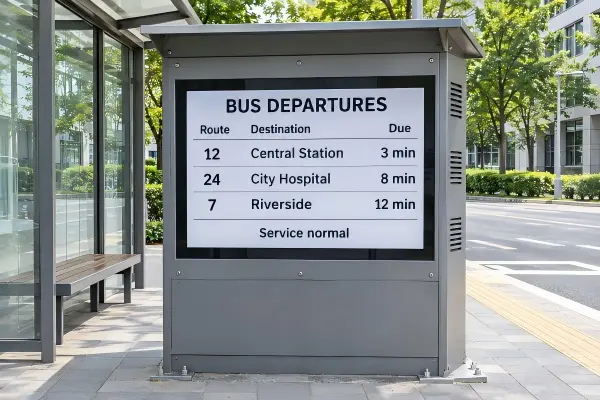
A high-brightness sunlight readable display is often a practical direction when the application needs strong emitted light to maintain image visibility in bright environments. It is most effective when paired with suitable cover glass, installation geometry, enclosure ventilation or thermal control, and validation under representative lighting conditions.
What High Brightness Solves—and What It Does Not
A high-brightness LCD increases the light output coming from the display. This can improve visibility when ambient light is high, especially where the panel faces bright daylight and users need to read content quickly.
For industrial and commercial equipment, high brightness may suit:
- Outdoor and semi-outdoor self-service terminals
- Transportation information displays
- Retail kiosks near entrances or windows
- Industrial HMIs installed in bright production areas
- Marine, logistics, or field-service equipment
- Digital signage with controlled sun exposure
However, high brightness does not automatically solve:
- Surface glare from cover glass
- Internal reflections between the LCD and protective glass
- Heat buildup inside a sealed enclosure
- Increased power consumption
- Poor screen placement facing the sun
- Low-contrast interface design
We have seen buyers focus on a brightness number before confirming whether the display will face east or west, sit under a canopy, or operate behind reflective protective glass. Those installation details often change the recommended direction.
Procurement Questions for High-Brightness LCDs
When evaluating a supplier, we suggest buyers request more than a brightness statement. Ask for the actual panel model or approved panel range, interface details, dimming method, power requirements, mechanical drawings, and operating-temperature documentation.
For a customized industrial monitor, it is also useful to confirm:
- Whether brightness can be adjusted automatically or manually
- Whether the enclosure supports heat dissipation
- Whether the selected panel has a suitable supply lifecycle
- Whether the backlight design supports the expected operating schedule
- Whether a sample can be tested in the intended enclosure
At AplusLCD, we discuss panel sourcing, brightness options, mounting, touch technology, power input, and enclosure requirements together. For current models and brightness tiers, see our high brightness LCD monitor series and the high brightness monitor solutions page, which map brightness levels to real installation environments. We do not treat a high-brightness panel as a standalone guarantee of outdoor performance. Buyers should verify relevant certification documents and validate the final assembled equipment under their own target conditions.
How Do Transflective LCD and Optical Bonding Improve Sunlight Readable Performance?
Buyers sometimes frame transflective LCD, high brightness, and optical bonding as three competing products. That comparison is misleading. A transflective panel changes how the display uses ambient light, while optical bonding mainly improves the optical path between the LCD and cover glass.
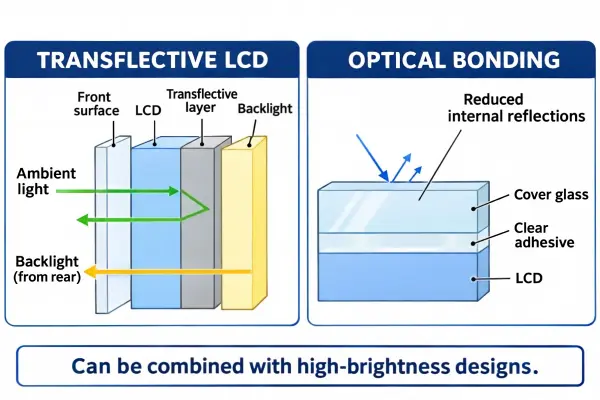
Transflective LCD technology can support sunlight readable applications by using reflected ambient light to assist visibility, while optical bonding reduces internal reflections and can improve perceived contrast. Optical bonding is not a replacement for brightness; it is often a complementary design option for high-brightness or other industrial LCD configurations.
Transflective LCD: A Specific Tool for Specific Tasks
A transflective LCD is designed to use both backlight illumination and reflected ambient light. In bright conditions, ambient light can contribute to screen visibility rather than only overwhelming it. This characteristic can be valuable where power management, lighting variation, and readable information take priority.
A transflective approach may deserve evaluation when an application has:
- Strong and variable ambient light
- A need for readable text, icons, or structured data
- Power constraints
- Outdoor mobility or field use
- A viewing task that does not depend primarily on rich color video presentation
Still, transflective technology is not a universal outdoor replacement. Buyers should assess the required color experience, image quality, size availability, interface needs, cost target, and supply continuity. A large digital-signage screen and a compact portable industrial terminal may have very different transflective suitability.
Optical Bonding: Contrast Improvement, Not “More Nits”
Traditional display assemblies can contain an air gap between the LCD and the protective cover glass or touch layer. Light can reflect at each interface. Those reflections reduce perceived contrast and can make the display look less clear in bright environments.
Optical bonding fills the gap with a transparent bonding material. This can reduce internal reflections and create a more unified visual appearance. It may also support a more robust assembly design, depending on the materials and construction.
| Approach | Primary contribution | Key evaluation concern |
|---|---|---|
| High-brightness LCD | Raises emitted light output | Heat, power, backlight lifecycle, enclosure design |
| Transflective LCD | Uses ambient light as part of the viewing strategy | Content type, color expectations, size and cost |
| Optical bonding | Reduces internal reflections and improves perceived contrast | Cover-glass design, repair strategy, qualification process |
| Shading or recessed mounting | Reduces direct light exposure | Mechanical design and user viewing angle |
For many OEM designs, the most appropriate solution may be a combination: a high-brightness industrial LCD, optically bonded cover glass, anti-glare surface treatment, and a shaded mechanical installation. For a deeper technical comparison of bonding structures, see our optical bonding vs air gap guide. The correct combination must be confirmed through engineering review and sample testing rather than assumed from a specification sheet.
What Should OEMs Include in a Sunlight Readable Display RFQ?
An incomplete RFQ creates inaccurate comparisons. If every supplier receives only “outdoor monitor required,” each supplier may quote a different interpretation. The result is a price comparison without a consistent technical baseline.
An effective sunlight readable display RFQ should describe the installation, lighting exposure, viewing task, operating schedule, temperature environment, mechanical constraints, and validation plan. This information helps suppliers recommend a suitable panel, brightness range, bonding option, touch solution, and enclosure approach.
A Practical Pre-Quotation Checklist
Before requesting a quote, we recommend that procurement and engineering teams align on the following details:
- Sun exposure: Is the display in direct sun, indirect daylight, or mixed lighting?
- Installation geometry: Which direction does the screen face, and what tilt angle is planned?
- Shading: Does the design include a hood, bezel recess, canopy, or enclosure overhang?
- Viewing task: Will users read large promotional content, small text, QR codes, alarms, or detailed controls?
- Viewing distance: How close will users stand, and from which angles?
- Operating schedule: Will the unit operate intermittently, during business hours, or continuously?
- Temperature exposure: What are the expected ambient conditions, including solar heating effects?
- Electrical limits: What power input, consumption, and dimming control are available?
- Mechanical requirements: What are the size, mounting, sealing, touch, and cover-glass constraints?
- Sample validation: Can the OEM test a sample in a representative enclosure and location?
This checklist reduces late-stage changes. It also makes supplier selection more transparent. We recommend comparing suppliers on panel source, manufacturing controls, inspection process, documentation, lifecycle planning, lead time, and responsiveness to engineering questions—not only on the initial unit price.
Frequently Asked Questions
Is a higher nit rating always better for outdoor displays?
No. A higher nit rating can help a display compete with bright ambient light, but it may also increase power use and thermal load. Reflections, screen angle, cover glass, shading, and content contrast can still limit readability. We recommend evaluating the full installation.
Does optical bonding make a display brighter?
Optical bonding does not directly increase the LCD’s light output. It mainly reduces internal reflections between the display, touch layer, and cover glass. This can improve perceived contrast and clarity, especially in bright environments.
Can transflective LCD replace high-brightness LCD?
A transflective LCD may be appropriate for certain outdoor or mobile tasks, particularly where ambient-light use and power efficiency matter. It is not automatically suitable for every application. Content requirements, color expectations, display size, and the user experience should guide the decision.
What is the best way to validate a sunlight readable display?
We recommend testing a sample in a representative enclosure and installation position. The evaluation should include expected lighting, viewing angles, thermal conditions, interface content, and operating duration. Qualified engineering review is important for application-specific decisions.
Conclusion
A sunlight readable display is not selected by a single brightness number or a simple technology comparison. High brightness can add useful emitted light, transflective LCD can suit specific ambient-light and power conditions, and optical bonding can reduce reflections and improve perceived contrast. The strongest OEM decision starts with installation details, user tasks, thermal constraints, and sample validation. If you are specifying an outdoor or semi-outdoor display, contact AplusLCD with your application checklist for a practical industrial display evaluation.