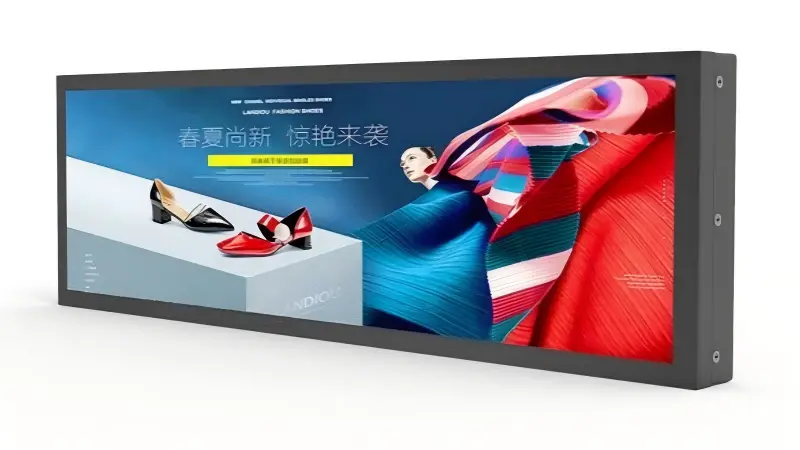
Shelf edge LCD displays can become difficult to manage when a retail team selects a playback method before defining its content workflow. I have seen projects focus on the word “Android,” then discover unanswered questions about updates, store-level control, network access, and support. The better solution is to choose the architecture that matches how your team will create, deliver, change, and troubleshoot content.
Android vs. HDMI shelf edge LCD displays should be selected based on content delivery and operational ownership, not assumed screen quality. Android models can support embedded playback and reduce hardware at each shelf, while HDMI models keep an external player or centralized system in control. I recommend that buyers first define who owns content, how frequently it changes, and how each display will be tested in the real retail workflow.
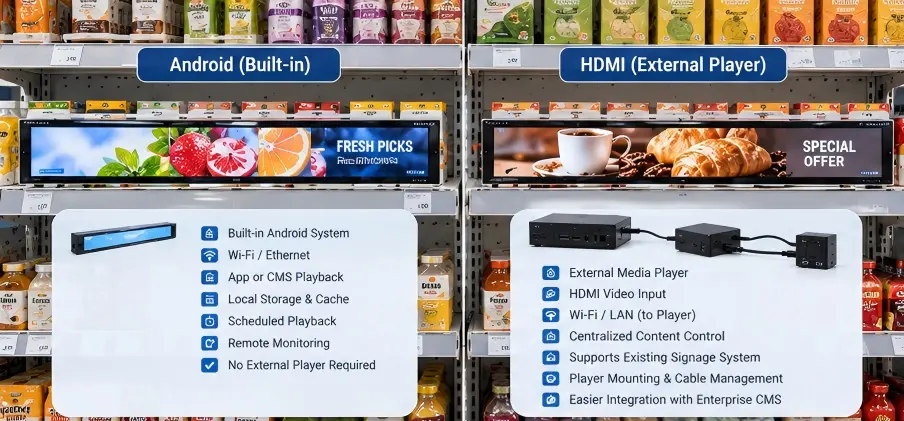
In my discussions with retail teams, the first technical question is often, “Should we use Android or HDMI?” I usually move the conversation one step earlier. We need to establish where content originates, how it reaches each shelf, and who will be responsible when a promotion needs changing across dozens or hundreds of locations.
How Should We Choose Shelf Edge LCD Displays Based on Content Ownership?
A retail deployment can fail operationally when the display choice does not match the content team’s process. A screen may fit the shelf perfectly, but store staff can still struggle if updates require unfamiliar software, manual intervention, or unclear ownership. I recommend that we start with the content workflow before reviewing display interfaces.
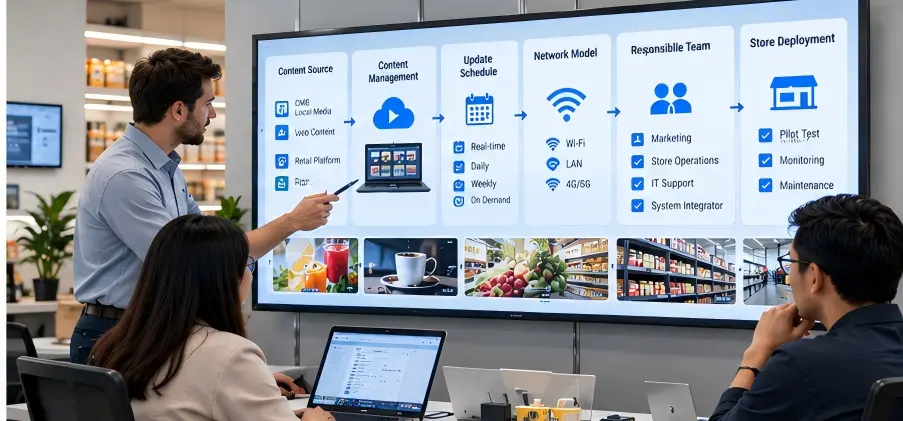
We should choose shelf edge LCD displays by identifying the content source, update frequency, network model, and responsible team. Android may suit projects that need playback inside the display, while HDMI may suit projects with an existing external player or centralized control platform. Neither option removes the need for content governance, deployment planning, and practical system testing.
Start With the Questions That Affect Daily Operations
When I help clarify a shelf-edge project, I do not begin with Android version or HDMI connector type. I first ask questions that reveal the operating model:
Where will the content come from?
Will it come from a digital-signage CMS, a local media player, an Android application, a web page, or a proprietary retail platform?Who updates the content?
A central marketing team, store managers, an IT department, a system integrator, or an external service provider may each need different permissions and tools.How often will content change?
Some stores update weekly promotions. Others need daily price campaigns, time-based menus, or inventory-linked messaging.Will each store show the same content?
National campaigns may use one standardized playlist, while regional stores may need different languages, prices, products, or seasonal promotions.What happens when a display loses connectivity?
We should define whether the screen needs local playback, cached content, a default image, or an alert to the support team.
Content Delivery Is More Important Than “Smart” Hardware
Android capability means that a display can run an embedded operating environment and, depending on the configuration, support an application or media playback without a separate player at the shelf. However, Android does not automatically create a complete content-management process.
An Android deployment can still require:
- App installation and version control
- Wi-Fi or Ethernet access planning
- User permissions and device access rules
- Remote monitoring tools
- Content synchronization procedures
- Recovery steps after a power interruption
- Security patch and operating-system update policies
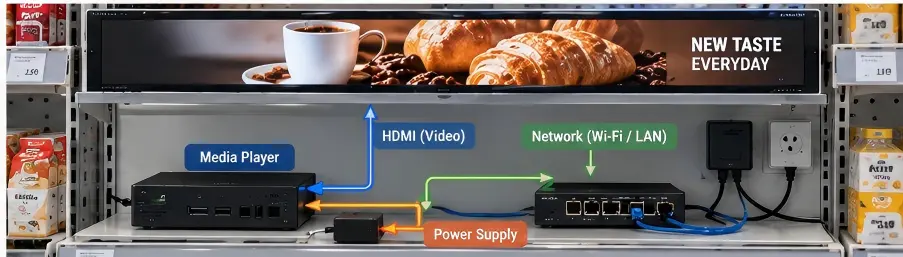
HDMI-based shelf edge LCD displays work differently. They receive a video signal from an external device, such as a media player, mini PC, signage controller, or retailer-managed hardware platform. This architecture may be simpler for teams that already operate a proven external content system. Yet it also introduces physical requirements, including player mounting, cable routing, power distribution, and replacement access.
In one early project discussion, I found that the buyer did not really need an Android screen. The buyer needed a reliable way to update promotions across several store zones. Once we clarified that an existing player platform already handled those updates, HDMI became a more practical sample configuration to evaluate.
The correct decision depends on ownership. If your organization wants the display point to handle playback, Android may fit. If your organization wants a separate system to remain the control center, HDMI may fit more naturally.
When Do Android Shelf Edge LCD Displays Fit a Retail Deployment?
Android shelf edge LCD displays can appear attractive because they may reduce the need for a separate player at every display location. However, the benefit can become limited if the project lacks a clear app, network, or device-management plan. I encourage retail teams to consider Android only after defining how embedded devices will be configured and maintained.
Android shelf edge LCD displays can fit projects that need embedded content playback, local applications, or fewer external devices at the shelf. They work best when the buyer has a defined method for app deployment, network access, remote updates, and technical support. We should validate the intended workflow on samples before approving a wider rollout.
Potential Advantages of Embedded Android Playback
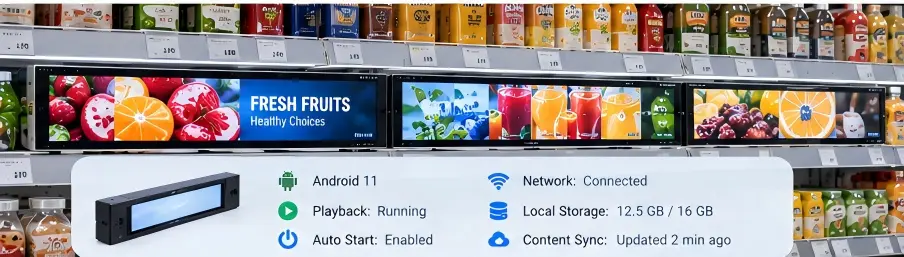
An Android-based display can combine the panel, display electronics, and playback environment into one device. This can make physical installation cleaner in certain shelf-edge designs because there may be no separate media player behind each display. That combined build is what we supply as an Android LCD display: panel, driver board and Android mainboard specified as one unit.
I generally see Android considered for these scenarios:
- Simple promotional loops, such as product videos, animated offers, or branded visuals
- Local playback requirements, where content needs to remain available during short network interruptions
- Interactive concepts, where touch input, barcode scanning, or a retail application is part of the design
- Space-constrained installations, where external players would be difficult to conceal or power
- Controlled deployments, where one technical team manages a known application across all stores
Android can also support custom development. However, custom software changes the procurement question. The team must now evaluate not only the display supplier, but also application development, software maintenance, security practices, and long-term operating-system support.
What Buyers Should Verify Before Selecting Android
I recommend that buyers request practical details rather than relying on a general statement that a unit “supports Android.” The specification should identify the relevant hardware and software configuration, such as processor, RAM, storage, Android version, network interfaces, USB ports, and available management methods.
| Evaluation item | Why it matters for Android shelf-edge projects |
|---|---|
| Android version | It affects application compatibility and long-term support planning. |
| RAM and storage | It influences the performance of apps, cached media, and content files. |
| Wi-Fi/Ethernet options | It determines how displays connect in real store environments. |
| Auto-start behavior | It affects recovery after a power interruption. |
| Remote-management method | It affects how teams deploy apps, content, and updates at scale. |
| Local content storage | It helps determine behavior when network access is interrupted. |
| Physical service access | It affects reset, maintenance, and replacement procedures. |
At AplusLCD, I would normally recommend that the buyer provide a sample content package or a test application before finalizing a configuration. Our role is to clarify display-side requirements and prepare suitable samples. The buyer or its software partner should still validate application behavior, network performance, and workflow compatibility in the actual retail environment.
When Do HDMI Shelf Edge LCD Displays Make Better Sense?
HDMI shelf edge LCD displays can be a strong option when a retailer already trusts an external player, signage controller, or centralized media architecture. The risk appears when teams overlook the physical work behind the screen. An external system still needs space, power, cable protection, replacement procedures, and support ownership.
HDMI shelf edge LCD displays often make sense when an external media player or centralized signage system should remain responsible for content delivery. They can support established retail technology stacks, but buyers should plan for player placement, HDMI cable length, power access, signal stability, and service procedures before selecting this approach.
Keep the Existing Content System in Control
For many chain-store projects, the display itself does not need to be the “smart” component. The retailer may already operate a content platform through a centralized media player, a compact PC, or a proprietary controller. In that case, HDMI can preserve a familiar architecture.
I often see HDMI considered when the project includes:
- A current digital-signage CMS with validated player hardware
- One player serving multiple nearby screens
- Existing IT procedures for player replacement and remote support
- A need to use a specific operating system or software platform
- A requirement to keep content processing separate from the display hardware
- A system integrator that already manages the playback layer
This model can help separate responsibilities. The display supplier provides the display hardware and agreed interface specifications. The retailer or integrator manages the player, content system, and network layer. That separation can simplify troubleshooting, but only if both sides document the boundaries clearly.
Physical Design Still Matters
HDMI is not simply a connector decision. It changes how the entire shelf-edge assembly is designed. A procurement team should check whether the player is located behind the shelf, inside a cabinet, above the gondola, or in a central equipment enclosure.
The team should also consider:
- Cable routing: HDMI cables need protection from pulling, bending, customer contact, and shelf restocking activity.
- Signal distance: Longer cable runs may require suitable cable quality, signal extenders, or a different distribution design.
- Power planning: External players require their own power source, which adds outlets and cable-management needs.
- Heat management: Enclosed retail fixtures can accumulate heat around players and power supplies.
- Replacement access: Store staff or field engineers need a practical way to replace a failed player without dismantling the shelf.
- Synchronization: If several displays show related content, the system should be tested for timing and output consistency.
I advise buyers not to assume that HDMI produces better or worse image quality than Android. Image quality depends primarily on display specifications, including panel resolution, brightness, contrast, color performance, viewing angle, anti-glare treatment, and the quality of the source content. HDMI and Android describe playback architecture, not the inherent quality of the LCD panel.
What Should We Test Before Ordering Shelf Edge LCD Displays?
A quotation can confirm size, interface, brightness, and mechanical options, but it cannot prove that a retail workflow will operate as intended. Teams may face unexpected issues after installation, especially when displays must run for long hours across multiple store layouts. I recommend a sample stage that tests both hardware fit and content operations.
Before ordering shelf edge LCD displays, we should test the complete workflow: physical mounting, content loading, network behavior, power recovery, update timing, and support procedures. Android samples should run the intended application or playback process, while HDMI samples should connect to the actual player and cable arrangement planned for deployment.

Build a Sample Plan Around Real Conditions
In our project discussions, I encourage buyers to avoid evaluating a display only on a desk. A shelf-edge unit may look acceptable in an office but behave differently in a store with overhead lighting, narrow viewing angles, limited cable space, and frequent shelf activity.
A structured sample plan should include the following checks.
| Test area | Android-focused test | HDMI-focused test |
|---|---|---|
| Content playback | Run the intended app, media files, and restart process. | Connect the actual player and verify output format. |
| Update workflow | Confirm remote or local content update steps. | Confirm player-side update and display response. |
| Power recovery | Test auto-start after power loss. | Test both player and display restart sequence. |
| Network behavior | Test reconnection and offline content behavior. | Test player network recovery and video output restoration. |
| Mechanical installation | Check bracket, shelf space, ports, and service access. | Check display, player, cable, and power placement together. |
| Viewing conditions | Assess brightness and readability under store lighting. | Assess the same panel requirements under store lighting. |
Evaluate the Display Separately From the Playback Method
The panel selection should remain a separate procurement decision. For example, a retail shelf with strong lighting may need higher brightness than a sheltered aisle. A product-price display may prioritize text clarity and viewing angle. A promotional video strip may prioritize aspect ratio, color, and motion content. Where the format is a long, narrow strip rather than 16:9, the stretched bar LCD display range covers the proportions normally used at the shelf edge.
Depending on the installation, buyers may need to evaluate:
- Display size and active area
- Resolution and native content format
- Brightness in cd/m² or nits
- Surface treatment, such as anti-glare options
- Touch requirements, if any
- Operating temperature and ventilation conditions
- Power input requirements
- Open-frame, panel-mount, or custom enclosure design
- Expected operating hours and supplier lifecycle support
At AplusLCD, we manufacture industrial and commercial display solutions for continuous-use environments, including customized LCD configurations. I would still advise every buyer to verify application-specific requirements, requested compliance documents, and real system performance during sample deployment. A display specification, certification document, or bench test should be reviewed against the project’s own market, installation, and software requirements.
Frequently Asked Questions
Is Android better than HDMI for shelf-edge displays?
Android is not automatically better than HDMI. Android can support embedded playback, while HDMI can keep an external player or central content system in control. I recommend choosing based on content ownership, update frequency, support resources, and the physical installation design.
Can Android shelf edge LCD displays work without a network?
Android shelf edge LCD displays may play locally stored content without a continuous network connection, depending on the application and configuration. However, remote content updates, monitoring, and troubleshooting usually require a planned connectivity method. We should test offline behavior during the sample stage.
Do HDMI shelf edge LCD displays need a separate media player?
An HDMI display needs an external HDMI video source. That source may be a dedicated media player, mini PC, centralized controller, or another compatible device. I recommend that buyers include the source device, cable route, power supply, and replacement process in the overall system plan.
Does HDMI provide better image quality than Android?
HDMI does not inherently provide better image quality than Android. Panel resolution, brightness, contrast, content quality, source settings, and display calibration have a larger effect. We should compare displays using the same content and the actual planned playback system.
What should I include in a shelf-edge display RFQ?
I recommend including display size, resolution, brightness target, mounting method, interface preference, content source, update frequency, operating hours, store environment, quantity, and sample requirements. This information helps us recommend a more relevant Android or HDMI configuration.
Conclusion
Android and HDMI shelf edge LCD displays solve different operational problems. Android can support embedded playback when your team can manage applications, network access, and updates at the display level. HDMI can fit established external-player systems, provided that cabling, power, service access, and content ownership are properly planned. I recommend that you define your real content workflow first, then validate both the display hardware and playback process with samples. The shelf edge display solutions page shows the installation patterns these configurations are built for. Contact our team to discuss a shelf-edge LCD configuration and sample plan for your retail project.