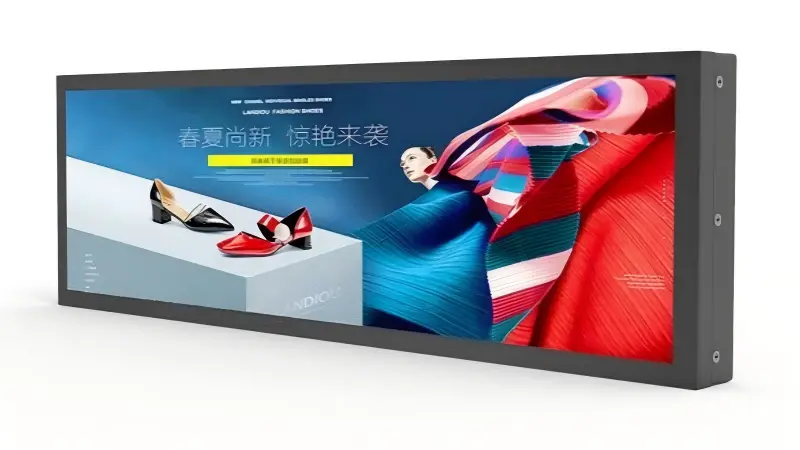
Custom OEM stretched LCD displays can create avoidable rework when buyers choose a screen format before defining the enclosure, content, and system requirements. A visually appealing ultra-wide display may still fail to fit, communicate information clearly, or connect reliably. I recommend treating customization as an integration decision from the start.
Custom OEM stretched LCD displays should be selected by validating the mechanical enclosure, content layout, electrical interface, operating conditions, and sample-test plan together. Screen dimensions and aspect ratio matter, but they are only useful after a buyer confirms that the display can be mounted, serviced, powered, controlled, and used effectively in the final device.
I have seen many early-stage inquiries begin with a desired stretched aspect ratio or a rough visible-area target. That is a useful starting point, but it rarely gives enough information for a reliable feasibility review. The following questions help OEMs and integrators reduce risks before they invest in samples or production planning.
Why Should Custom OEM Stretched LCD Displays Start With Integration Requirements?
Custom OEM stretched LCD displays can look straightforward on a specification sheet, yet the integration details often create the real challenge. A buyer may focus on the visible display area while overlooking mounting depth, rear clearance, cable routing, or front-glass alignment. Those issues can delay a prototype and force enclosure changes.
I recommend starting custom OEM stretched LCD display evaluation with the device enclosure and installation method. Buyers should define the mounting cutout, overall mechanical envelope, fixing points, orientation, bezel treatment, rear clearance, and service access before choosing a panel format. This approach helps prevent a display from becoming the limiting component of the final equipment design.
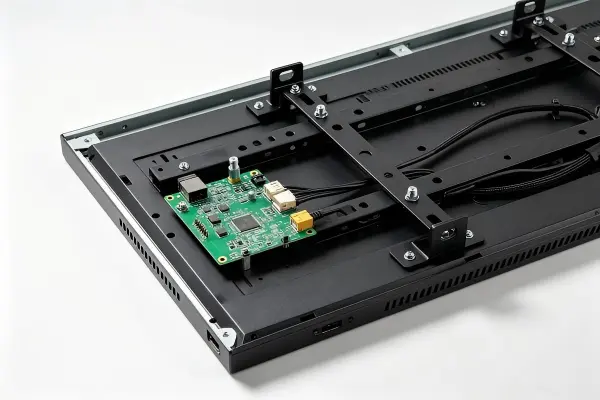
Define the Mechanical Envelope First
A stretched display is not simply a standard LCD with a different appearance. Its long, narrow geometry affects how the display is supported, protected, accessed, and connected inside a device.
In feasibility discussions, I often need to clarify several missing mechanical inputs. A buyer may provide an aspect ratio but not the enclosure drawing. Another buyer may specify the desired front opening but not the available depth behind the panel. These details determine whether a proposed custom OEM stretched LCD display is practical.
I suggest preparing a basic mechanical package that includes:
- Front cutout dimensions: The opening in the metal, plastic, or glass enclosure.
- Maximum external dimensions: Width, height, and depth available for the complete display assembly.
- Rear clearance: Space for the LCD module, controller board, cables, and connectors.
- Mounting method: Panel mount, open-frame mounting, VESA mounting, brackets, studs, or custom fixing points.
- Front-face design: Flush glass, raised bezel, anti-glare cover glass, branded printing, or protective cover.
- Orientation: Landscape, portrait, horizontal bar, vertical bar, or an angled installation.
- Service access: Access for cable replacement, controller replacement, or display maintenance.
Consider the Complete Assembly, Not Only the Panel
The bare LCD module is only one part of a finished stretched display solution. A production-ready assembly may include a controller board, backlight driver, cables, mounting structure, touch overlay, cover glass, and power-input solution.
| Integration Item | Why It Matters | Buyer Question |
|---|---|---|
| LCD active area | Determines usable image space | What content area must remain visible? |
| Outer dimensions | Determines enclosure fit | What is the maximum assembly footprint? |
| Controller board | Affects depth and cable placement | Where can the board be installed? |
| Cable exit direction | Affects clearance and serviceability | Can cables bend safely in the enclosure? |
| Mounting brackets | Supports vibration and installation | Who owns the mounting interface design? |
| Cover glass or touch layer | Changes thickness and optical performance | Is touch input or vandal resistance required? |
I also encourage buyers to think about the product’s lifecycle. A display that can only be removed by dismantling the entire terminal may increase field-service effort. This consideration is especially important for self-service kiosks, gaming cabinets, passenger-information equipment, and retail fixtures installed in multiple locations.
I treat the enclosure drawing as a risk-reduction document, not as a formality. Even an early drawing can reveal clearance, mounting, and service issues before a sample is built.
At AplusLCD, we can review project drawings and application requirements during an OEM or ODM feasibility discussion. However, I would not describe any configuration as confirmed until the relevant drawings, selected components, and sample validation path have been reviewed.
How Do Content and Viewing Conditions Affect Custom OEM Stretched LCD Displays?
Custom OEM stretched LCD displays may lose their intended value when the content does not match the format. A narrow display can be excellent for route information, promotional messaging, status indicators, or menu content. However, it can become difficult to read when designers try to compress a conventional landscape interface into an ultra-wide layout.
I advise buyers to evaluate custom OEM stretched LCD displays around the information task, not only resolution or aspect ratio. The right format depends on what users need to see, how far away they stand, the viewing angle, the dwell time, and which message must receive priority.
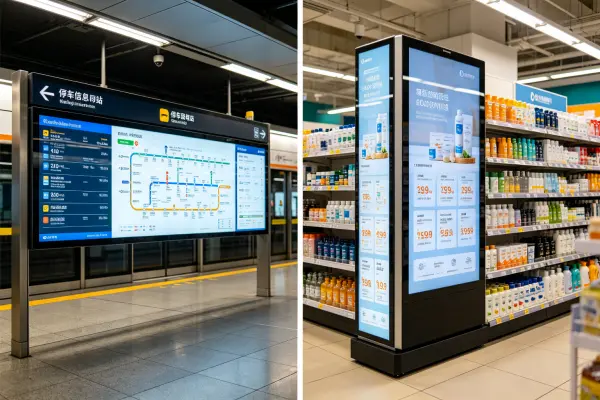
Match the Screen Format to the Information Task
A stretched LCD can support highly focused communication because it creates a distinct horizontal or vertical visual zone. Still, the display must serve the content rather than force content designers into an unsuitable layout.
I usually ask buyers to identify the primary task for the screen. For example, a passenger-information display may need to show destination, arrival timing, route status, and alerts. A retail shelf display may need to show product name, price, promotion, and stock message. A gaming machine may use a stretched display for game instructions, player status, or branded visual elements.
Each task has different requirements for text size, contrast, animation, and information hierarchy.
Ask Content Questions Before Finalizing Resolution
The resolution of a custom OEM stretched LCD display is meaningful only in the context of its operating distance and content structure. A high-resolution panel can still provide poor usability if text is too small, contrast is weak, or the user views the display from an extreme angle.
I recommend that buyers provide representative content early, such as:
- A UI wireframe or screenshot
- A video loop or animation concept
- Intended font sizes and language versions
- Required logo placement
- Priority alerts or warning messages
- A description of expected viewing distance
- Expected user dwell time
- The installation height and display angle
A simple content review can identify whether the display should be horizontal, vertical, split into zones, or paired with another screen.
| Deployment Scenario | Content Priority | Stretched Display Evaluation Focus |
|---|---|---|
| Self-service terminal | Instructions, queue status, transaction prompts | Readability at close range and touch-area layout |
| Gaming equipment | Branding, game state, visual effects | Color consistency, mounting, and controller synchronization |
| Retail shelf or menu | Price, promotion, product name | Viewing angle, brightness, and rapid message recognition |
| Passenger information | Route, timing, platform alerts | Text legibility, viewing distance, and continuous operation |
| Digital signage network | Scheduled advertising or notices | Media-player compatibility and content-management workflow |
Evaluate Viewing Conditions Honestly
The final installation environment can change the display decision. Indoor ambient light may require a different brightness target than a window-facing retail fixture. A display mounted low on a kiosk may need a different viewing-angle assessment than a display installed above eye level in a transit area.
I recommend buyers define:
- Ambient lighting: Indoor, shaded outdoor, direct sunlight exposure, or mixed lighting.
- Viewing distance: Close interaction, aisle viewing, room viewing, or long-distance public viewing.
- Viewing angle: Direct-facing, side viewing, upward viewing, or downward viewing.
- Operating duration: Intermittent use, business hours, or 24/7 operation.
- Content type: Static text, dynamic data, video, animation, or touchscreen UI.
For applications that require high brightness, anti-glare treatment, or specific optical performance, I recommend qualified evaluation in the actual installation environment. Product specifications can guide selection, but final readability depends on real content, mounting angle, ambient light, and system settings.
What Must Buyers Verify Before Ordering Custom OEM Stretched LCD Display Samples?
A lit sample can create false confidence. The display may show an image on a bench, but that does not prove that it will communicate correctly with the host system, fit the enclosure, handle the intended power condition, or behave as expected during startup and continuous operation.
I consider a custom OEM stretched LCD display sample a validation tool, not proof of production readiness. Buyers should verify mechanical fit, controller-board behavior, signal compatibility, power input, touch performance, firmware expectations, and host-system operation before approving a production configuration.
Confirm the Electrical and Signal Interface
The host system and display assembly must work together as a complete chain. A buyer should not assume that HDMI, DisplayPort, LVDS, eDP, USB, or other interfaces are automatically interchangeable. The selected LCD panel, controller board, cable assembly, and host output must be reviewed as a compatible set.
In feasibility discussions, I often need to clarify whether the customer plans to use an existing media player, an industrial PC, a custom embedded board, or a third-party controller. That information can affect the controller selection, cable design, power arrangement, and startup behavior.
I suggest confirming the following items before sample approval:
- Video input interface: HDMI, DisplayPort, LVDS, eDP, VGA, or another required input.
- Native resolution and timing: Whether the host can output the panel’s intended resolution and refresh settings.
- Power input: Required voltage, current margin, connector type, and polarity.
- Controller-board location: Available installation space, thermal exposure, and cable reach.
- Startup behavior: Input detection, power-on sequence, default source, and recovery after power interruption.
- Backlight control: Brightness adjustment, dimming behavior, and any required external control.
- Touch interface: USB or other interface, touch-point requirements, calibration, and operating-system support.
- EMC and grounding considerations: System-level design factors that should be evaluated by qualified engineers.
Test the Display in Its Real Host System
A bench setup is useful, but I encourage buyers to test the display with the actual host system whenever possible. A media player may output content differently from a PC. A custom embedded board may require timing adjustments. A touchscreen may need calibration within the final mechanical stack-up.
A practical sample-validation plan can include:
| Validation Area | What the Buyer Should Check |
|---|---|
| Mechanical fit | Cutout alignment, depth, bracket access, cable routing |
| Image output | Resolution, scaling, image position, color appearance |
| Host compatibility | Startup, restart, input detection, long-duration behavior |
| Touch function | Accuracy, edge response, driver behavior, glass integration |
| Power behavior | Start-up stability, voltage compatibility, connector security |
| Thermal conditions | Heat accumulation in the enclosure during intended use |
| Serviceability | Ability to remove or replace relevant parts safely |
I have found that early questions about controller-board behavior can save significant redesign effort. For example, the physical location of a controller may be acceptable in a desktop sample but unsuitable inside a narrow, sealed, or highly integrated terminal.
AplusLCD can support sample discussions for industrial display projects, including open-frame displays, panel-mount solutions, touchscreen configurations, and custom integration requirements. Still, I recommend that buyers treat compatibility as project-specific. Final approval should depend on drawings, system conditions, and documented sample validation.
What Information Should an OEM Send for a Custom OEM Stretched LCD Display Inquiry?
Many OEM inquiries begin with only a target aspect ratio, a screen size estimate, or a product photo. Those inputs can begin a conversation, but they often leave the most important integration questions unanswered. Incomplete information can produce an unsuitable quotation or an overly broad recommendation.
The best custom OEM stretched LCD display inquiry is a risk-reduction package. I recommend that buyers send the application scenario, mechanical drawings, visible-area requirements, content format, system interface, operating environment, estimated quantity, and intended validation path. This information supports a more relevant feasibility review and sample proposal.
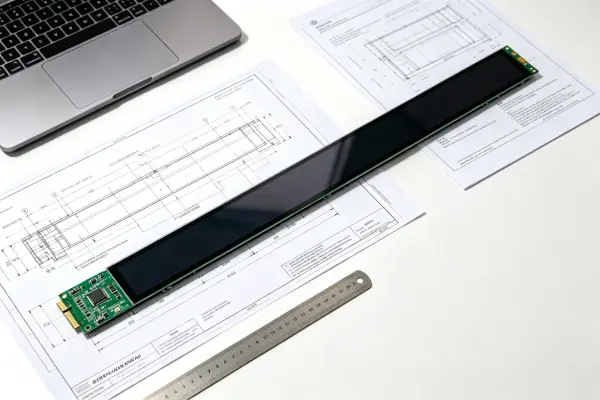
Build an Inquiry Package That Supports Feasibility Review
I do not expect every buyer to have a complete engineering package at the first contact. Early-stage projects often evolve. However, even preliminary drawings and basic system information can help us identify key risks before we recommend a solution.
A useful inquiry can include the following details.
1. Application and User Scenario
Describe where and how the display will be used:
- Self-service kiosk, gaming cabinet, retail shelf, transport display, menu board, or industrial equipment
- Indoor, outdoor, semi-outdoor, or window-facing installation
- Expected operation schedule, including whether 24/7 use is required
- Whether the screen is viewed by operators, customers, passengers, or maintenance staff
2. Mechanical and Optical Requirements
Provide available drawings or dimensional targets:
- Enclosure front opening
- Maximum outer dimensions
- Depth restrictions
- Required active display area
- Mounting preference
- Required cover glass or touchscreen
- Desired brightness range based on ambient conditions
- Preferred orientation
3. Content and Software Information
A stretched display needs content designed for its format. I recommend sharing:
- UI screenshots or layout sketches
- Media-player model or operating system
- Video format and content-management platform
- Screen orientation requirements
- Language requirements
- Whether the display needs split-screen zones or dynamic data
4. Electrical and Interface Requirements
The display recommendation should reflect the host system:
- Required video input
- Power supply availability, such as 12V, 24V, or wide-range DC input
- Cable length limits
- Touch interface requirements
- Brightness-control requirements
- Existing PC, player, or embedded control board details
5. Commercial and Validation Expectations
A supplier also needs to understand the project path:
- Sample quantity
- Expected pilot quantity and production volume
- Target timeline
- Desired branding or private-label requirements
- Required documentation
- Target market compliance requirements
- Required shipping terms, such as EXW, FOB, CIF, or DDP
Use Certifications and Supply Commitments Carefully
For regulated or market-specific deployments, I recommend that buyers state their required compliance documents at the inquiry stage. For example, buyers may request CE, FCC, CB, RoHS, or REACH-related documentation depending on the destination market and product configuration.
At AplusLCD, our factory quality system and product documentation can support relevant project discussions. However, I encourage buyers to verify the applicability, scope, validity, and configuration coverage of any certificate or report for their exact product and destination market. A system integrator may also need additional system-level testing that goes beyond the display itself.
A strong inquiry does not guarantee feasibility. It gives both the buyer and supplier a clearer basis for identifying what must be confirmed through engineering review and sample testing.
For OEM and ODM projects, we can review customization requests involving size, brightness, touch technology, power input, enclosure design, branding, and mounting approach. We assess feasibility based on the actual project information rather than making unconditional promises from a single screen specification.
Frequently Asked Questions
What is a custom OEM stretched LCD display?
A custom OEM stretched LCD display is an ultra-wide or narrow-format display assembly configured for a specific device or deployment. Customization may involve the LCD panel, controller board, brightness, touch option, cover glass, mounting method, power input, branding, and enclosure interface. Final feasibility depends on project requirements and validation.
Are stretched LCD displays suitable for self-service kiosks?
Stretched LCD displays can suit self-service kiosks when the content task supports a narrow format. I recommend evaluating readable text size, touch layout, mounting depth, viewing angle, host compatibility, and service access. A stretched display works best when it has a clear informational role rather than a purely decorative purpose.
Does a powered-on sample prove compatibility?
No. A powered-on sample only confirms that the display can operate in that test setup. Buyers should still validate the host interface, native resolution, power behavior, controller-board placement, enclosure fit, touch performance, thermal conditions, and long-duration operation in the intended system.
What drawings are needed for a stretched LCD display quotation?
I recommend providing a front cutout drawing, maximum available width, height and depth, mounting details, cable-clearance information, and desired visible area. Even a preliminary CAD file, PDF drawing, or annotated sketch can help identify integration risks before a supplier recommends a sample configuration.
Can a stretched LCD display be used in 24/7 applications?
A stretched LCD display may be specified for continuous-use environments when the panel, backlight, thermal design, power arrangement, and operating environment are appropriate for the application. I recommend reviewing the actual duty cycle and enclosure conditions, then validating the selected assembly through a qualified sample-test process.
Conclusion
Custom OEM stretched LCD displays should be evaluated as part of a complete device system, not as isolated panels. I recommend that buyers begin with enclosure drawings, mounting requirements, content purpose, viewing conditions, host interfaces, power requirements, and a realistic sample-validation plan. This process helps reduce mechanical, electrical, and usability rework before production decisions. If you are planning a stretched LCD project for a kiosk, gaming device, retail system, digital-signage network, or passenger-information application, I invite you to share your drawings and requirements with AplusLCD for an application-specific feasibility review.