Shelf edge digital signage can be difficult to deploy when retailers treat it as a small version of standard digital signage. A display may fit inside a shelf channel but still create problems with cables, heat, power access, content readability, and replacement work. A successful project starts with integration planning, not screen dimensions alone.
Shelf edge digital signage uses narrow bar LCD displays to present product-specific prices, promotions, product details, or operational messages close to the merchandise. Retailers and system integrators should select these displays based on readable active area, installation tolerance, brightness, power and network architecture, service access, and long-term supply—not only on whether the enclosure fits the shelf.

In our experience at AplusLCD, the most important questions often appear before production starts. Where will each cable run? How will the installer replace a failed unit? Is there enough airflow behind the shelf? These practical details can determine whether a pilot becomes a manageable multi-store rollout.
Why Is Shelf Edge Digital Signage Different From Conventional Digital Signage?
Shelf edge digital signage creates challenges because it operates at close viewing distances, within limited physical space, and beside products that can block access during installation or maintenance. A conventional promotional screen can often use large visuals and open mounting space. A shelf-edge display cannot rely on either advantage.
Shelf edge digital signage is a near-viewing information interface rather than simply a miniature advertising display. It must communicate product-relevant content clearly within a narrow format while fitting the store’s shelf structure, power plan, player architecture, and maintenance process. This makes deployment engineering as important as visual design.
The viewing task is more specific
Large retail digital signage may attract attention from several meters away. A shelf-edge bar LCD usually serves a different task. The shopper, store associate, or field technician may stand only 30–100 cm from the screen. The display may need to show:
- Product name and variant
- Price or promotional information
- Stock or availability messaging
- Ingredients, specifications, or compliance notices
- QR codes or digital product references
- Operational information for store staff
This close-range use changes how integrators should assess the display. The most visually impressive screen is not always the most useful shelf-edge option. A narrow screen with a poorly planned content template can make text too small, crop critical information, or leave unused space around the active area.
Bar LCD aspect ratios affect content planning
Bar LCD displays commonly use stretched formats such as 16:3, 24:9, 32:9, or other custom active-area proportions.[1] These formats can fit shelf edges more naturally than standard 16:9 panels. However, they also require content teams and CMS providers to support non-standard canvas sizes.
I have seen project discussions focus heavily on enclosure width while leaving the active display area until later. That approach can create surprises. A 28-inch bar display may physically fit the shelf, but its pixel layout may not support the intended product cards, price tiles, or motion graphics without redesign.
| Evaluation Point | Conventional Digital Signage | Shelf-Edge Bar LCD Display |
|---|---|---|
| Typical viewing distance | Several meters | Close range, often under 1 meter |
| Main role | Brand, promotion, wayfinding | Product-level information and messaging |
| Available mounting space | Often open wall, ceiling, or stand | Tight shelf channels and cabinet recesses |
| Content format | Standard landscape or portrait | Narrow, stretched, site-specific layouts |
| Service access | Often rear or side access | May be blocked by shelves, products, or fixtures |
| Deployment risk | Visual and structural | Integration, power, heat, access, and scaling |
Do not confuse a sample with a rollout-ready solution
A single shelf edge digital signage sample can work well in a showroom or one test location. That does not automatically prove that the design can scale across 50, 500, or 5,000 shelves.
Before approving a pilot, I recommend that integrators test the full operating model:
- Install the display using the intended shelf fixture.
- Route production-grade power and signal cables.
- Run the selected player, CMS, and network setup.
- Confirm content rendering at the final resolution.
- Test replacement access with normal store shelving in place.
- Review cleaning, stock replenishment, and accidental impact risks.
- Confirm spare-unit and repair procedures.
This process helps separate a visually successful demonstration from a supportable field deployment.
How Should Integrators Specify Shelf Edge Digital Signage Displays?
Shelf edge digital signage specifications should begin with the retail fixture and system architecture rather than a generic display data sheet. Integrators can avoid costly revisions by mapping physical constraints, content requirements, electrical conditions, and service procedures before they select screen size, brightness, interfaces, and mounting details.
The best shelf edge digital signage specification connects each display parameter to a site requirement. Screen size must fit the usable shelf opening; brightness must match ambient light; interfaces must work with the selected player; and enclosure design must preserve cable routing, ventilation, and replacement access.
Start with the real shelf opening
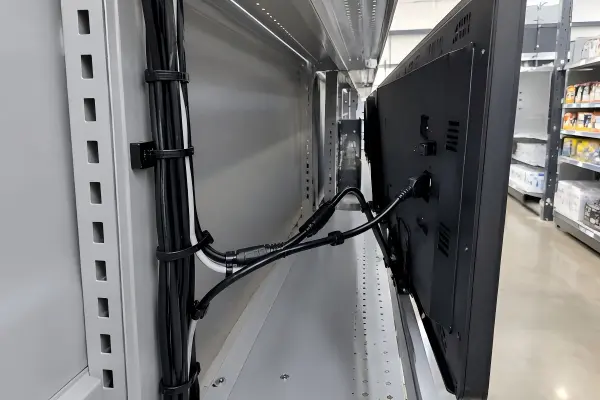
A shelf channel can have a nominal width that differs from its usable installation width. Metal brackets, shelf lips, cable clips, signage rails, and product dividers can reduce the available space. A display that fits on a drawing may become difficult to install when tolerances are considered.
We typically encourage buyers to provide more than the front-facing opening measurement. A useful mechanical review includes:
- Maximum enclosure width, height, and depth
- Active-area target and bezel allowance
- Shelf material and mounting points
- Front, rear, and side access restrictions
- Shelf pitch and product overhang
- Cable entry direction
- Permitted drilling or fixture modifications
- Required ingress protection, if applicable
Choose brightness for the actual lighting environment
Brightness is often expressed in cd/m², also called nits. More brightness can improve visibility in bright retail areas, but it also increases heat generation and power consumption.[2] A display installed under direct lighting, near a storefront window, or below reflective shelving may require a different brightness target than one installed in a controlled aisle.
A practical brightness evaluation should consider:
| Site Condition | Display Consideration | Integration Risk |
|---|---|---|
| Standard indoor aisle lighting | Moderate brightness may be sufficient | Over-specification can add heat and cost |
| Strong overhead LED lighting | Higher brightness or anti-glare treatment may help | Reflection can reduce readability[3] |
| Window-facing shelf | Site testing is important | Seasonal sunlight conditions can change |
| Refrigerated or enclosed fixture | Thermal design is critical | Heat accumulation can shorten component life |
| Dim specialty retail area | Lower brightness may improve comfort | Excess brightness can look harsh |
We do not recommend selecting a high-brightness bar LCD solely because a higher number appears better on paper. The correct brightness is the one that supports legibility at the site while remaining compatible with the enclosure’s thermal and power limits.
Match interfaces to the complete system
HDMI is common for many retail media players, but it is not the only consideration. Depending on the project, the display may require HDMI, DisplayPort, USB for touch or control, RS-232, LAN, or other project-specific connections. Some installations may use Android-based players, Windows systems, external media players, or embedded computing hardware.
Interface selection should be validated with the actual player and CMS workflow. A display can show video correctly during a bench test but still encounter issues involving resolution detection, auto-restart behavior, content orientation, remote control, or power recovery in the field.
For this reason, I recommend a written compatibility checklist before mass production:
Display compatibility is project-specific. Integrators should validate the selected bar LCD, media player, CMS, network method, power-recovery behavior, and content format as one working system.
What Installation Issues Can Cause Shelf Edge Digital Signage Failures?
Shelf edge digital signage can fail operationally when mounting, cable routing, ventilation, or power design is added after the screen has already been selected. These issues may not appear during a short demo, but they can delay installation, complicate replacement work, and increase maintenance cost across multiple locations.
The most common shelf edge digital signage problems are not always panel failures. They often involve inaccessible cables, insufficient airflow, unstable power connections, tight mounting tolerances, or no practical method to remove and replace a display without dismantling part of the shelf.
Cable routing needs space and protection
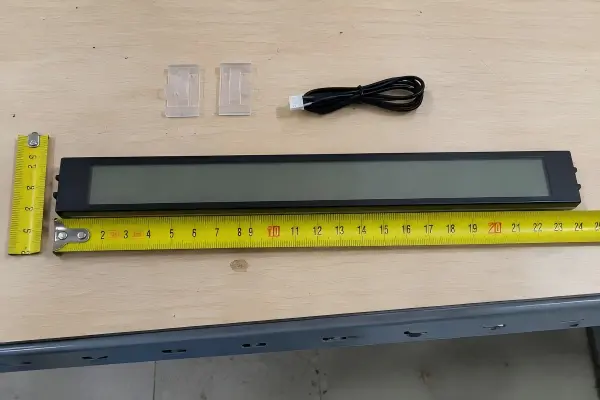
A bar LCD may only be a few centimeters deep, but the final installation depth includes cable connectors, bend radius, cable strain relief, adapters, and sometimes a media player. A rear-facing HDMI connector can require more clearance than expected. A power plug may protrude into a shelf cavity. An adapter can become a weak point if it moves during stocking or cleaning.
I remember reviewing an early shelf concept where the display enclosure fit correctly, but the connector clearance did not. The team had to revise the rear cavity and cable exit path before the installation could proceed. That type of issue is easier to solve during mechanical review than after fixtures are installed.
Integrators should confirm:
- Connector orientation: rear, side, bottom, or angled
- Minimum cable bend radius
- Cable retention and strain relief
- Separation between power and data cables
- Protection from product loading and shelf movement
- Access for installers to connect and disconnect cables
- Labeling for faster field troubleshooting
Heat must have a path to escape
Display electronics generate heat during continuous operation.[4] Higher brightness settings, enclosed shelf structures, nearby power supplies, and media players can raise internal temperature. In a tightly enclosed retail fixture, the ambient temperature around the display may be higher than the store’s room temperature.
A thermal plan does not always require active cooling. However, it should identify how heat will move away from the display. Depending on the fixture, the solution may include rear clearance, ventilation slots, conductive mounting surfaces, lower brightness settings, or a revised placement for the power supply and player.
For industrial and commercial display projects, we also recommend buyers review operating-temperature requirements against the supplier’s documented specifications. Claims regarding temperature range, continuous-use suitability, and expected lifecycle should be supported by product documents and project validation rather than assumed from a similar display model.
Serviceability should be designed into the shelf
A display that cannot be replaced quickly can create a disproportionate field-service burden.[5] If a technician must remove products, shelf brackets, trim panels, and adjacent displays to access one unit, the cost of a simple replacement can become significant.
A serviceable shelf-edge design usually provides:
- A defined removal direction, such as front extraction or slide-out access.
- Accessible fasteners that do not require dismantling the full fixture.
- Quick-connect power and signal paths where appropriate.
- Clear unit labeling for model, position, and serial tracking.
- A spare-unit strategy for the most critical display sizes.
- Documented installation instructions for field teams.
At AplusLCD, we work on display-side customization such as enclosure dimensions, mounting arrangements, brightness options, touch configurations, and power requirements. However, the final fixture, CMS, network, and service workflow should be evaluated by the integrator and qualified project professionals for the specific retail environment.
How Do CMS, Media Players, and Maintenance Plans Affect Shelf Edge Digital Signage?
Shelf edge digital signage depends on a coordinated hardware and software system. A bar LCD is only one component. The display must work with the selected CMS, media player, network connection, power-recovery logic, content format, and maintenance procedure before a retailer can deploy it confidently across many stores.
Shelf edge digital signage should be validated as a complete system before rollout. Integrators should test display resolution, content templates, player output, remote management, network behavior, power recovery, and field replacement procedures together because compatibility and reliability are project-specific.
Content resolution must match the active area
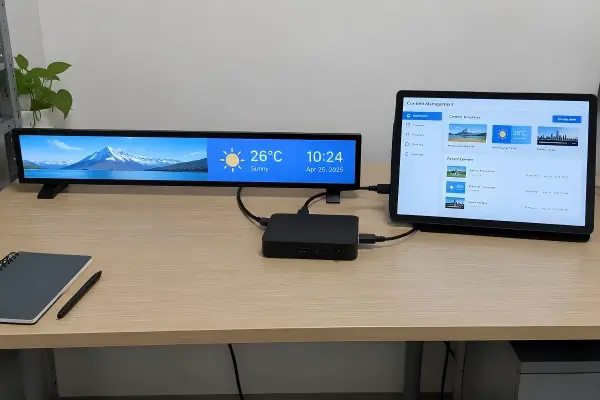
Bar LCD displays can use uncommon native resolutions. A stretched panel may require a content canvas that differs from standard 1920 × 1080 or 3840 × 2160 layouts. If the CMS or player does not support the required output resolution, the system may stretch content, add black bars, crop information, or reduce text clarity.[6]
Integrators should validate the following during the pilot stage:
- Native panel resolution
- Display orientation
- Player-supported output modes
- CMS template support for stretched layouts
- Font readability at close viewing distance
- Video scaling behavior
- Image and animation loading performance
- Power-on and reboot behavior after outages
The content team should receive the exact active-area resolution early. This avoids redesigning templates after the hardware decision is already fixed.
Power recovery matters in unattended environments
Retail locations can experience planned shutdowns, breaker trips, power interruptions, or overnight equipment resets.[7] A display and media player may behave differently after power returns. One device may restart automatically while another waits for manual input. A CMS may reconnect quickly, or it may require a longer network initialization sequence.
These details are often overlooked during initial testing because a bench setup remains powered continuously. For a realistic evaluation, I suggest conducting repeated power-cycle tests with the final display, player, network connection, and content configuration.
Build a lifecycle plan before purchase orders
Long-term supply and repair planning matter when an installation uses many displays across multiple locations. Buyers should ask suppliers about panel availability, product revision control, spare-unit planning, repair pathways, and documented quality processes.
At AplusLCD, our stated manufacturing process includes ERP traceability, 24-hour aging tests, and multiple inspection stages. We also operate under ISO 9001:2015 and ISO 14001:2015 systems, according to our company documentation. Buyers should always request and verify current certification documents, product test reports, and model-specific compliance records for their target market.
A practical supplier review can include:
| Supplier Evaluation Question | Why It Matters for Retail Rollouts |
|---|---|
| Can the supplier maintain the selected panel or offer controlled alternatives? | Reduces redesign risk during replenishment |
| Is there a defined revision-control process? | Helps maintain consistency across stores |
| Can the supplier provide mechanical drawings and interface details? | Supports fixture and player integration |
| Are sample and pilot units representative of production units? | Helps reduce rollout surprises |
| Is there an RMA and spare-parts process? | Supports faster field recovery |
| Can the supplier support low-volume replacements? | Important after the initial rollout |
| Are compliance documents available for review? | Supports procurement and market-access checks |
Frequently Asked Questions
What is shelf edge digital signage?
Shelf edge digital signage is a retail display solution that places narrow LCD screens along shelves, product rails, or fixture edges. It can present product-related information, pricing, promotions, or operational content. Successful deployments require attention to visibility, mounting, power, media playback, and maintenance access.
What size bar LCD display is best for a retail shelf?
The best bar LCD size depends on the usable shelf opening, active-area requirements, content layout, mounting tolerance, and service clearance. Buyers should measure the complete fixture, including brackets, cable space, product overhang, and removal access, instead of selecting a display based on front width alone.
How bright should a shelf-edge bar LCD be?
Brightness should match the actual ambient light, reflections, viewing distance, and enclosure thermal conditions. A higher-nit display may help in bright areas, but it can also increase heat and power demand. Site testing is the safest method for selecting a suitable brightness level.
Can any CMS work with a bar LCD display?
No CMS or media-player compatibility should be assumed. The CMS, player, display resolution, orientation, network method, and power-recovery behavior should be tested together. Bar LCD displays often use non-standard resolutions, so content-template and player-output validation are especially important.
How can retailers make shelf-edge displays easier to maintain?
Retailers can improve maintainability by designing front or slide-out access, accessible connectors, labeled cables, replaceable mounting hardware, and a spare-unit process. Field technicians should be able to remove and replace a display without dismantling major shelf sections or disturbing adjacent equipment.
Conclusion
Shelf edge digital signage works best when retailers and integrators treat bar LCD displays as long-life information interfaces rather than miniature promotional screens. The right display must fit the fixture, support readable content, connect reliably to the selected system, manage heat, and remain easy to replace in the field. At AplusLCD, we help B2B buyers evaluate bar LCD dimensions, brightness, interfaces, mounting, and customization options for project-specific deployments. Contact our team to discuss your shelf-edge display drawings, sample requirements, and rollout plan.
Footnotes
-
"Display aspect ratio", https://en.wikipedia.org/wiki/Display_aspect_ratio. Display-technology references describe bar-type LCD panels as elongated displays available in nonstandard aspect ratios designed for constrained or panoramic information layouts. Evidence role: definition; source type: research. Supports: Technical documentation or display-technology literature describing stretched LCD panels and their nonstandard aspect ratios.. Scope note: Available aspect ratios vary by manufacturer, panel generation, and active-area dimensions. ↩
-
"Liquid crystal display and organic light-emitting diode ... - PMC", https://pmc.ncbi.nlm.nih.gov/articles/PMC6060049/. Display-engineering research indicates that higher backlight luminance generally requires greater electrical power and produces additional heat, while adequate luminance contrast is important for readability in bright environments. Evidence role: mechanism; source type: paper. Supports: Evidence that higher LCD backlight output is associated with greater electrical power use and thermal dissipation, and that ambient luminance affects display visibility.. Scope note: The quantitative relationship depends on panel technology, optical stack, automatic-brightness control, and ambient lighting. ↩
-
"Lighting and Reflections - Video Displays, Work, and Vision", https://www.ncbi.nlm.nih.gov/books/NBK216496/. Visual-display guidance explains that reflected light and glare can reduce effective screen contrast, thereby making text and graphical information more difficult to read. Evidence role: mechanism; source type: institution. Supports: Standards or research showing that reflected glare reduces effective display contrast and can impair legibility.. Scope note: The severity of the effect depends on screen finish, viewing angle, illumination geometry, and content contrast. ↩
-
"NIST Team Demonstrates Novel Way to Convert Heat ...", https://www.nist.gov/news-events/news/2023/05/nist-team-demonstrates-novel-way-convert-heat-electricity. Electrical-engineering references explain that operating electronic components dissipate a portion of their consumed electrical power as heat, making thermal management relevant for continuously powered displays. Evidence role: mechanism; source type: education. Supports: Engineering principles explaining that electrical energy consumed by electronic display components is dissipated partly as heat.. Scope note: Actual heat output depends on display size, brightness, power electronics, operating mode, and surrounding equipment. ↩
-
"9.5 Operability and Maintainability Review", https://projectdeliverymanual.engineering.lacity.gov/chapter-9-qaqc-during-design/95-operability-and-maintainability-review. Maintainability research generally finds that accessible components and defined replacement procedures can reduce maintenance time, labor demand, and equipment downtime. Evidence role: general_support; source type: research. Supports: Maintainability research linking accessibility and replacement procedures to maintenance time, labor, downtime, or lifecycle cost.. Scope note: The size of the effect for retail shelf fixtures depends on store procedures, technician skill, inventory handling, and fixture design. ↩
-
"Aspect ratio (image)", https://en.wikipedia.org/wiki/Aspect_ratio_(image). Digital-imaging and display references explain that mismatched source and display aspect ratios may require scaling, cropping, or letterboxing, and resampling can reduce the clarity of fine text and image detail. Evidence role: mechanism; source type: education. Supports: Technical explanations of how mismatched source and native display resolutions or aspect ratios lead to scaling, letterboxing, cropping, and potential loss of detail.. Scope note: The visual impact depends on the player’s scaling algorithm, content design, and the display's native resolution. ↩
-
"Power Outages", https://www.ready.gov/power-outages. Business-continuity guidance for commercial operations recognizes utility outages and electrical interruptions as foreseeable disruptions for which equipment restart and recovery procedures should be planned. Evidence role: general_support; source type: government. Supports: Government or public-sector business-continuity guidance recognizing that commercial operations should plan for utility outages and electrical interruptions.. Scope note: Such guidance establishes the relevance of outage planning but does not quantify interruption rates for a particular retailer or store. ↩