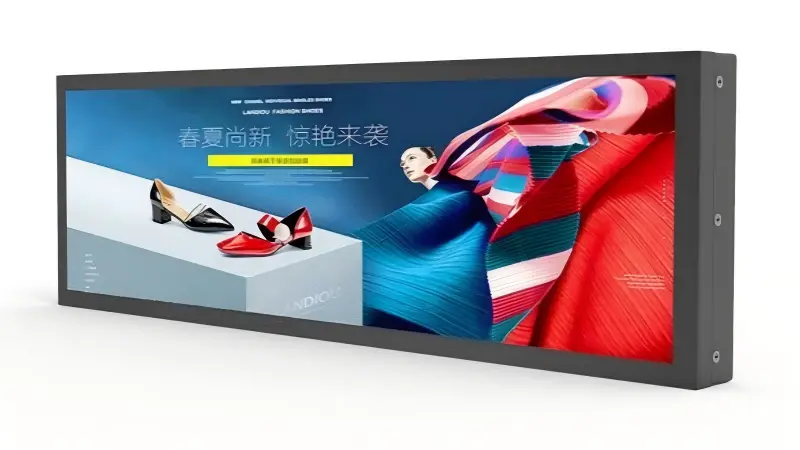
A shelf edge display project usually starts with a price-per-screen target and ends with a fitting problem. The screen that looked right in a supplier photograph is 40 mm too wide for the bay, or tall enough to cover the facings above the rail, or it leaves a gap at each upright that a store manager will not accept. In my experience the fix is unglamorous: measure the bay first, then pick the size.
Match a shelf edge display to the bay width rather than adapting the shelving to the screen. A 23.1" unit with a 597 × 60 mm outline suits a 600 mm grocery or pharmacy bay; the 35" (891.6 × 60.4 mm) covers most of a 900 mm bay; the 37" (932 × 282 mm) also suits a 900 mm bay but is a half-height panel for bay headers and end caps; the 47.1" (1214.8 × 68.8 mm) covers a full 1200 mm run in one piece.
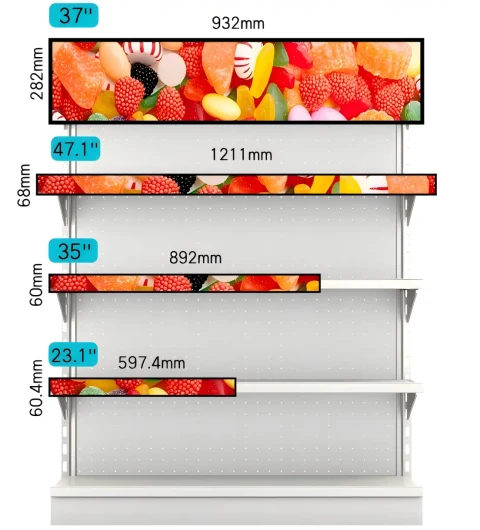
The four sizes below are the ones we keep in stock for shelf work. Everything else in the stretched bar LCD display range is cut to order, and that is a different decision with a different lead time — I come back to it at the end.
Why Does Bay Width Decide the Display Size?
Retail shelving is built on repeatable module widths. Gondola and wall bay systems are specified at nominal widths — 600, 900 and 1200 mm are the common ones — but the usable width inside the uprights is always less than the nominal figure. Upright thickness, end caps and the clearance you want at each end all come off the number before a screen is chosen.
This is why I ask buyers for two measurements rather than one: nominal bay width, and usable rail width. A 900 mm bay that measures 870 mm inside the uprights will not take a 891.6 mm outline without fouling, whatever the nominal figure suggests. Where the usable width sits between two stock outlines, the choice is usually the smaller unit with a deliberate end gap, not a custom cut — a visible gap reads as intentional, a screen wedged against an upright does not.
The second mechanical constraint is height. A shelf edge screen sits in the strip above the product and below the next shelf. Anything taller than that strip covers facings, which is the fastest way to lose store-manager support for a rollout. This is the constraint that separates the three strips from the one half-height panel in the set.
Which Shelf Edge Display Size Fits a 600, 900 or 1200 mm Bay?
Read this table by outline width first, then check height against the strip you actually have.
| Size | Model | Outline (W×H) | Active area (W×H) | Resolution | Brightness | Bay it suits |
|---|---|---|---|---|---|---|
| 23.1" | AP-231OPLB | 597 × 60 mm | 585.6 × 48.19 mm | 1920×158 | 700 nits | 600 mm |
| 35" | AP-35OPLB | 891.6 × 60.4 mm | 877.82 × 45.72 mm | 3840×200 | 500 nits | 900 mm |
| 37" | AP-37OPLB | 932 × 282 mm | 899.71 × 253.04 mm | 1920×540 | 700 nits | 900 mm (half-height) |
| 47.1" | AP-471OPLB | 1214.8 × 68.8 mm | 1196.16 × 49.84 mm | 3840×160 | 500 nits | 1200 mm |
Three of these are strips: roughly 60 to 69 mm tall, so they sit on the rail without eating into the shelf above. The 37" is not a strip, and that is the whole point of it.
The 47.1" is the one worth arguing for on long runs. Covering 1200 mm with a single panel removes a seam, removes one power drop and one data connection, and removes the alignment problem that two butt-joined units create when the shelving is not perfectly straight. Where a run is longer than 1200 mm, the same logic applies in reverse: decide whether you want repeating 1200 mm units or a single cut length, because the content layout is different for each.
Full mechanical drawings, connector positions and mounting options for each size are on the individual pages — 23.1 inch, 35 inch, 37 inch and 47.1 inch.
What Is the Difference Between a Shelf Strip and a Half-Height Panel?
This distinction decides more than the dimensions suggest.
A strip — the 23.1", 35" and 47.1" — carries a single line of information. Price, product name, a promotion flag, maybe a short scrolling field. That is what most electronic shelf-edge deployments need, and the low height is exactly why the format survives on a rail: it does not block merchandise and it does not change how the shelf is planogrammed.
The 37" is a different tool. At 932 × 282 mm with a 1920×540 panel, it has the height to carry a price block and imagery in one screen: a product shot above a price, a brand panel on a bay header, a promotional visual on an end cap. I recommend it where the commercial case depends on brand content rather than price accuracy alone — a cosmetics bay, a promotional end cap, a pharmacy category header. I would not put it on a standard grocery rail, where 282 mm of height takes the facings you are trying to sell from.
The practical test is simple: if your content is one line of text, use a strip. If it needs a second element that cannot live in 60 mm, use the 37" — and check that the position you have in mind actually has 282 mm of height available.
Do You Need 500 or 700 Nits on a Shelf?
Brightness on a shelf is not a series-level decision, it is a per-position one, and our four stock sizes already split across it: the 23.1" and 37" are 700-nit parts, the 35" and 47.1" are 500-nit parts.
For general grocery and pharmacy lighting, 500 nits is usually sufficient and costs less in power and heat. I specify 700 nits where the shelf sits under higher ambient light, and I treat those two numbers as a starting point rather than a limit — the same sizes can be built up to 1500 nits where an aisle runs under spotlights or beside a window.
What I would not do is specify brightness without stating the measurement conditions. Ask whether the figure was read on a bare panel or on the complete unit with cover glass, at what ambient temperature, and after how long. A number without those conditions is a claim, not a specification, and it is the most common source of disappointment when a sample arrives in-store.
How Is Content Managed Along a Run of Bays?
Three models cover almost every deployment we see:
- USB auto-play — content loaded on a drive, played on loop. Fine for a single-store trial, unmanageable beyond that.
- External media player over HDMI — right when the site already runs a signage player and you want the display to be a panel, not a platform.
- Built-in Android with CMS — the default for multi-store rollouts. Prices templated against the product master, updates pushed by store, aisle or time of day, playback status confirmed from one dashboard.
For price-driven deployments the CMS route is the one that pays for itself, because it removes the re-keying step: a price change in the POS or pricing server flows to the shelf instead of being re-typed into a design tool. It also removes the shelf-versus-checkout mismatch that draws regulatory attention in several markets.
One design constraint is worth flagging before content is produced. On a 48 mm-tall active area, a price block has very little vertical room. Content designed for 16:9 and then stretched into a bar almost always fails. Design to the native resolution of the size you are buying — 1920×158, 3840×200, 1920×540 or 3840×160 — or the legibility problem will be blamed on the display.
How Do You Power and Connect a Shelf Run?
Power and data are installation problems, and they are where rollouts stall.
Most deployments run a low-voltage rail or a daisy-chained strip along the shelf, with the route chosen so a restocker cannot snag it. With the Android mainboard you also need data — usually Wi-Fi to each unit, or a wired run per bay where the RF environment is hostile. Power and data should be settled during the pilot, on the real shelving, before a store-wide order is placed.
I also recommend confirming service access at the design stage: whether a failed unit can be swapped without dismantling the bay, and what spare level you intend to hold. These two answers change the total cost of ownership far more than the unit price difference between two sizes.
When Is a Custom Cut the Better Answer?
When no stock outline fits the usable width, or the ratio you need does not exist in the set. We cut from 8.8" to 93.8" at any aspect ratio, and for shelf work I insist on sealed cut edges — unsealed edges are where moisture enters in chilled and fresh-food aisles, and it is the single most common field failure in low-cost bar displays. It never shows up in a dry showroom trial.
Custom cutting is an engineering decision, not a preference. It affects drawings, samples, lead time and long-term maintenance, so it should answer a documented constraint rather than a wish. The verification steps for that path — electrical and signal confirmation, and the sample validation plan — are set out in What Must Buyers Verify Before Ordering Custom OEM Stretched LCD Display Samples.
For the general site-assessment process that precedes all of this — usable space, viewing distance, dwell time, content fit — see the stretched bar LCD display buyer's guide. This article assumes those questions are answered and deals with which stock size to order.
What Should Be in the Shelf Edge RFQ?
Bay width and usable rail width, rail profile type, available height and depth, ambient light at the shelf, chilled aisle or not, content type, price source, power and data availability at the shelf, quantity for the pilot and for the rollout.
I have put the full list in a checklist you can copy into your own RFQ.
Frequently Asked Questions
Which shelf edge display size fits a 900 mm bay?
Two of them, for different jobs. The 35" is an 891.6 × 60.4 mm strip that covers most of a 900 mm bay while staying about 60 mm tall, so it suits a standard rail. The 37" is 932 × 282 mm and is a half-height panel, so it suits a 900 mm bay header, an end cap or a deeper shelf edge where the price block sits beside imagery. Choose by height available, not by width alone.
Can one display cover a 1200 mm shelf run?
Yes — the 47.1" has a 1214.8 mm outline and covers a full 1200 mm run in a single 24:1 panel. That removes the seam, one power drop and one data connection compared with two joined units, and avoids the alignment problem that butt-joined screens show on shelving that is not perfectly straight.
Is 500 nits enough for a supermarket shelf?
For standard ceiling lighting, generally yes — 500 nits is the stock configuration for our 35" and 47.1" shelf sizes. We specify 700 nits (the stock level on the 23.1" and 37") where the shelf sits under higher ambient light, and build any of the four up to 1500 nits for aisles under spotlights or near windows.
Do shelf edge displays update prices automatically?
With the built-in Android mainboard and CMS they can. Prices are templated against your product master and pushed over the network, so a change in the POS or pricing server reaches the shelf without manual re-keying. USB auto-play and external media players are also supported, but they do not give central updates.
What if none of the four stock sizes fits our shelving?
We cut to order from 8.8" to 93.8" at any aspect ratio. Send the rail profile, usable width, available height and depth, and a photograph of the aisle, and our engineers confirm the cut dimensions and mounting method. For chilled and fresh-food aisles, specify sealed cut edges.
Conclusion
The right shelf edge display is the one whose outline fits the usable bay width and whose height fits the strip, before brightness, resolution and price enter the conversation. Start with the two measurements, pick the stock outline that fits, and only go custom when a documented constraint blocks all four. If you are planning a shelf-edge rollout, send your bay width, rail profile and aisle photograph to AplusLCD and we will confirm the fit and quote the matching size. For the full application detail, see our shelf edge display solutions page.