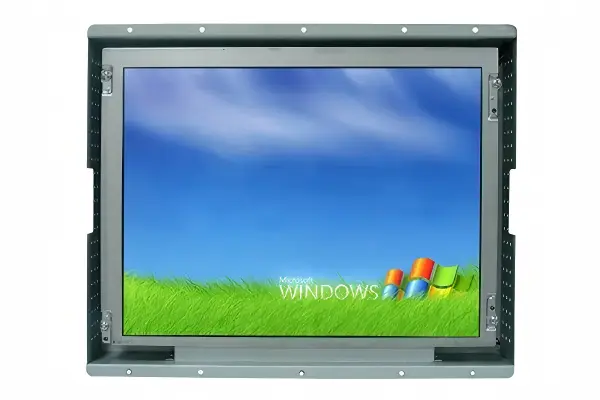
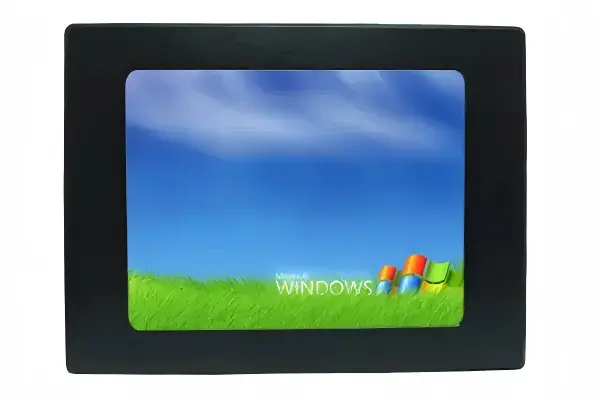
Industrial LCD display physics can seem abstract when a screen specification only lists size, brightness, and resolution. That gap creates risk for OEM engineers: a display may look suitable on paper yet become difficult to read after installation. I explain the optical path and the practical selection factors that matter in real industrial equipment.
An industrial LCD display works by controlling light from an LED backlight. The backlight produces white illumination, while polarizers, liquid-crystal cells, TFT-controlled pixels, and color filters regulate how much red, green, and blue light reaches the viewer[1]. In industrial applications, usable visibility depends on the entire optical system, including ambient light, reflections, viewing angle, enclosure design, and installation position—not brightness alone.
I have worked with panel selection, complete-display assembly, and sample validation for industrial display projects. In that work, I have learned that the physics matters, but the installation environment usually determines whether an LCD solution succeeds. The sections below connect basic display operation with practical procurement and engineering evaluation.
How Does Industrial LCD Display Physics Create an Image?
An LCD module does not create visible light in the same way as a direct-view LED wall. This distinction can confuse a specification review and lead buyers toward the wrong display technology. I find that engineers can reduce this confusion by tracing the light path from the rear backlight to the viewer’s eyes.
Industrial LCD display physics creates an image by selectively transmitting backlight through millions of controlled subpixels[2]. A thin-film transistor, or TFT, controls the liquid-crystal state in each subpixel. The liquid crystals alter polarized light[3], and red, green, and blue color filters combine to form the final image seen by the user.
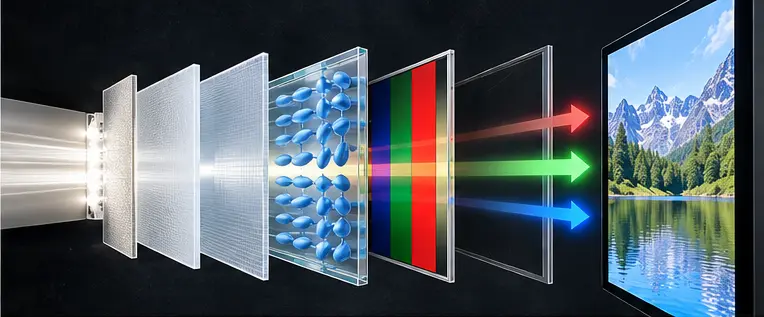
The basic light path inside an LCD
I usually describe the optical system as a controlled path rather than a single screen component:
- LED backlight: LEDs at the rear or edge of the module generate illumination.
- Optical films: Diffusers, prism films, reflectors, and other layers help distribute and direct the light.
- Rear polarizer: This layer polarizes the light before it reaches the liquid-crystal cell.
- TFT and liquid-crystal layer: The TFT array applies electrical control to each subpixel. The liquid-crystal molecules change their orientation in response.
- Color filter: Each pixel includes red, green, and blue subpixels. Their relative output creates the displayed color.
- Front polarizer and cover surface: The final optical layers determine how the light exits toward the viewer.
The liquid-crystal layer does not usually emit the visible image light itself. Instead, it acts more like a controllable optical valve. When the display electronics change the voltage applied to a subpixel, the liquid-crystal orientation changes. That change affects how much polarized backlight can pass through the optical stack.
Why black and color performance are not simple
A practical LCD cannot block every photon of light under all conditions. Some light leakage, reflections, and surface effects can reduce perceived black depth[4]. Therefore, I do not evaluate contrast only as a datasheet number. I also consider the actual viewing environment.
For example, a kiosk installed in a bright lobby may show reflections from overhead lighting. Even if the panel has an acceptable native contrast specification, reflected light can make dark interface elements appear washed out. A control-room monitor may have a different problem: wide viewing positions can make contrast or color consistency more important than maximum brightness.
When I review industrial LCD display physics for a project, I ask these questions early:
- Where will the display face relative to windows and lighting?
- Will the user view the screen directly, from above, or from an angle?
- Does the application use dark graphics, small text, alarms, or color-coded controls?
- Will a front glass, touch overlay, or protective film add reflections?
- Does the enclosure create heat near the panel or backlight?
These questions turn basic LCD physics into an engineering requirement that a supplier can help validate.
Is an Industrial LED Display the Same as an LED-Backlit LCD?
The word “LED display” is used loosely in commercial conversations. That wording can create a serious technical misunderstanding. I have seen buyers describe an LCD monitor as an LED display simply because the product uses LED backlighting. The two technologies use LEDs in very different ways.
An LED-backlit industrial LCD monitor is not a self-emissive LED display. In an LCD monitor, LEDs provide the backlight and liquid-crystal pixels control that light. In a true direct-view LED display, individual LED packages or micro-LED elements form the visible image pixels and emit light directly toward the viewer.
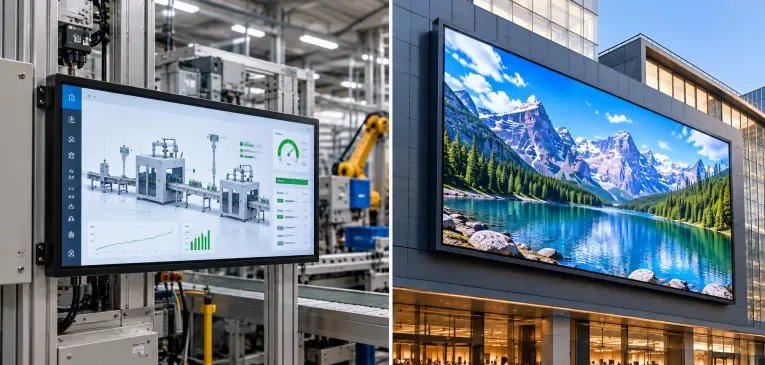
Two display architectures, two evaluation methods
The distinction affects mechanical design, pixel pitch, viewing distance, power planning, service strategy, and purchasing criteria.
| Evaluation point | LED-backlit industrial LCD | Direct-view LED display |
|---|---|---|
| Image-forming element | Liquid-crystal pixels and color filters | Self-emissive LED pixels or modules |
| Role of LEDs | Backlight illumination source | Direct image pixel source |
| Typical integration format | Monitor, open-frame display, panel-mount display, Panel PC | Modular cabinet, LED tile, video wall |
| Pixel structure | Fixed panel resolution | Pixel pitch depends on module design |
| Common buyer focus | Interface, optical bonding, touch, enclosure fit, panel lifecycle | Pixel pitch, viewing distance, module serviceability, calibration |
| Typical close-range use | HMIs, kiosks, medical devices, POS, embedded equipment | Large-format public viewing, signage, venue displays |
I recommend that OEM teams use precise language in their RFQ documents. If the requirement is an LCD monitor with an LED backlight, the RFQ should specify industrial TFT LCD, panel size, resolution, luminance target, interface, touch type, and installation conditions. If the requirement is a direct-view LED solution, the RFQ should specify pixel pitch, viewing distance, module configuration, and cabinet arrangement.
Why the wording matters during supplier selection
A supplier quotation can appear technically correct while addressing the wrong product category. For example, an OEM may need a 15-inch panel-mount HMI display with PCAP touch and a specific rear mounting pattern. That requirement points toward an industrial LCD assembly, not a direct-view LED module. Standard starting formats include open-frame industrial LCD monitors for kiosk and machine integration, and enclosed or panel-mount assemblies for front-mount HMIs.
I recommend that buyers confirm the following before comparing prices:
- Is the quoted product a complete LCD monitor, an LCD kit, or a direct-view LED module?
- Does the quotation identify the LCD panel model or at least the approved panel class?
- Is the stated brightness measured for the complete display or only the bare panel?
- Does the design include a touch panel, cover glass, or optical bonding?
- Are the interface and power requirements compatible with the host equipment?
- Can the supplier provide current drawings, test records, and applicable compliance documents for verification?
At AplusLCD, I would treat this clarification as part of the initial feasibility discussion. I would not assume that “LED screen” means the same thing to every engineering team. Clear terminology prevents avoidable sample delays and specification revisions.
Why Is Brightness Only One Part of Industrial LCD Display Physics?
A brightness value can look decisive in a comparison table. However, brightness alone does not determine whether users can read a display in an installed machine, kiosk, vehicle, or outdoor-adjacent terminal. I have found that the best starting point is not “How many nits do we need?” but “What light reaches the screen surface?”
In industrial LCD display physics, brightness is the light emitted from the display, while readability depends on the balance between emitted light and ambient light reflected from the screen. Surface treatment, cover glass, optical bonding, viewing angle, screen orientation, enclosure geometry, and user position can all influence perceived visibility.

Brightness versus readability
The industry commonly uses cd/m², often called nits, to describe display luminance. This measurement is useful, but I treat it as one input rather than a final answer.
A display with higher luminance may improve visibility in a bright environment. Still, higher nits do not automatically guarantee sunlight readability in every installation. Direct sun, a glossy front surface, high-angle reflections, and a poorly positioned enclosure can overcome the practical benefit of increased backlight output. I treat higher nits as one lever among several, which is why I review mechanical shading, surface treatment, and bonding together when a project targets a high-brightness industrial LCD monitor.
I recommend evaluating the following system-level factors:
| Factor | Why it affects readability | What I would review |
|---|---|---|
| Ambient light | Strong surroundings reduce perceived contrast | Indoor, shaded outdoor, or direct-sun exposure |
| Surface finish | Glossy surfaces can reflect windows and lamps | Anti-glare, anti-reflective, or standard glass options |
| Optical bonding | Air gaps can add internal reflections | Bonding approach and repair implications |
| Viewing angle | Off-axis viewing can change perceived contrast and color | Operator position and screen tilt |
| Enclosure design | Recesses, bezels, and hoods can block or create reflections | Mechanical drawings and installation photos |
| UI design | Small fonts and low-contrast colors are harder to see | Actual application screenshots and test content |
I start with the installation environment
During sample validation, I prefer to ask for installation photos, CAD drawings, or even a simple sketch of the intended location. This is often more useful than debating a brightness number in isolation.
For example, a display mounted behind a kiosk window may need evaluation of the outer glass, air gap, glare angle, and thermal buildup. A display in a factory HMI may face overhead LED lighting, oil residue, operator gloves, and repeated side-angle viewing. A transit application may experience changing light conditions throughout the day.
I consider a sample successful only when the complete display assembly is reviewed in a representative environment, not merely powered on at a workbench.
A practical validation plan can include:
- Testing the sample with the intended UI screens.
- Reviewing legibility from normal operator positions.
- Checking reflections with nearby lights switched on.
- Inspecting the display at expected viewing angles.
- Confirming thermal behavior inside the planned enclosure.
- Recording configuration details so the production unit matches the approved sample.
Any brightness, optical performance, or lifetime figure should be verified against the relevant product datasheet and test record. I would also recommend qualified engineering evaluation when an application has safety, transportation, medical, or severe outdoor exposure requirements.
What Makes an Industrial LCD Display Suitable for 24/7 Equipment?
Basic LCD physics explains how a display controls light, but it does not establish whether the finished product is suitable for continuous industrial service. OEM teams sometimes focus on the panel alone and overlook the complete assembly. I have learned that long-term suitability depends on component selection, integration, quality controls, and application-specific validation.
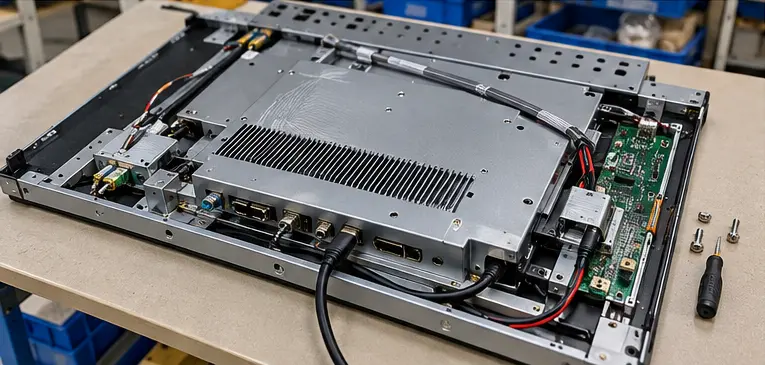
An industrial LCD display becomes suitable for demanding equipment through the combined design of the panel, LED backlight, power system, thermal path, mechanical housing, interface electronics, touch solution, and production controls[5]. Buyers should verify these factors through current datasheets, drawings, test records, and sample evaluation rather than relying on a single “industrial grade” label.
Industrial performance is a complete-system question
An industrial display assembly may include many components beyond the LCD cell:
- LCD panel
- LED backlight system
- Controller board and signal interface
- Power board or DC input circuit
- Touch panel and controller
- Cover glass or protective window
- Metal chassis and mounting hardware
- Heat dissipation features
- Cables, connectors, and strain relief
- Firmware and on-screen display controls
Each component can affect field performance. For instance, an enclosure with limited airflow may raise internal temperature. A display mounted in a vibrating machine may need more attention to connector retention and mechanical support. A touch display used with gloves, water exposure, or cleaning chemicals needs an appropriate touch technology and front-surface design.
A procurement checklist for industrial LCD displays
I recommend that OEM buyers evaluate the supplier and product with a documented checklist.
| Procurement area | Questions to ask |
|---|---|
| Panel selection | Is the panel class identified? Is the supply outlook documented? |
| Temperature range | What operating and storage limits are listed in the current datasheet? |
| Backlight | What backlight specification and validation record are available? |
| 24/7 application | Has the supplier reviewed the duty cycle, thermal environment, and content pattern? |
| Mechanical fit | Are drawings available for outline, active area, mounting, connectors, and rear clearance? |
| Interfaces | Are HDMI, DP, VGA, LVDS, eDP, USB touch, or other required interfaces confirmed? |
| Quality process | What incoming inspection, aging, functional testing, and final inspection steps are documented? |
| Compliance | Can the supplier provide applicable CE, FCC, CB, RoHS, REACH, or other documents for verification? |
| Supply continuity | Can the supplier explain panel sourcing, change control, and replacement planning? |
| Service | What are the DOA, RMA, spare-part, and warranty procedures? |
At AplusLCD, our team can support OEM/ODM projects from panel selection through sample assembly and production. For the full scope of what we can manufacture — custom size, brightness, touch, and interface options — see our custom OEM/ODM display solution. Our manufacturing context includes industrial LCD, touch display, and Panel PC assembly, but I would still advise every buyer to validate the final configuration in the actual application. A qualified professional should review application-specific requirements where failure could affect safety, compliance, or critical operations.
How Should OEMs Validate Industrial LCD Display Physics Before Production?
A technically plausible display can still fail as a product decision if the sample does not match production conditions. This risk becomes greater when an OEM adds cover glass, touch layers, a sealed enclosure, custom cables, or a high-brightness configuration. I recommend a structured sample path that connects optical behavior to manufacturing control.
OEMs should validate industrial LCD display physics through a representative sample build, documented environmental assumptions, real UI content, mechanical-fit checks, and agreed acceptance criteria. The goal is to confirm the complete display system—not only the bare panel—before moving from prototype to pilot production and volume orders.

Build a validation plan before requesting a sample
I find that a good RFQ includes more than a screen size and quantity. It should define how the display will operate after integration.
A useful sample-validation package may include:
- Target screen size, resolution, and aspect ratio
- Required brightness range or environmental description
- Touch technology and cover-lens requirements
- Interface, connector direction, and cable length
- Input voltage and power constraints
- Mounting method and mechanical drawing
- Enclosure details, airflow assumptions, and nearby heat sources
- Installation angle and normal user viewing distance
- Expected operating schedule
- Target market and requested compliance documentation
- Forecast quantity and supply-continuity expectations
Define acceptance criteria that can be checked
I recommend that the buyer and supplier agree on measurable criteria before sample approval. This reduces subjective disagreements later.
| Validation item | Example acceptance question |
|---|---|
| Image quality | Is text legible with the intended application interface? |
| Reflection control | Are reflections acceptable under representative site lighting? |
| Touch response | Does touch operate correctly with the expected user method? |
| Mechanical fit | Does the display fit the enclosure without cable stress or interference? |
| Thermal integration | Does the complete unit remain within documented operating conditions? |
| Interface stability | Does the display maintain stable operation with the intended host system? |
| Production consistency | Is the approved panel and configuration controlled for production orders? |
I once reviewed a display sample that looked excellent on an open bench. After the customer placed it behind a front window in the intended enclosure, reflections changed the perceived contrast enough to require a design review. The LCD panel was not “wrong.” The original evaluation simply did not represent the final optical stack.
That experience reinforced an important point: industrial LCD display physics is only useful when it is applied to the complete installation. A sample should replicate the real display path as closely as possible, from backlight and panel to touch layer, cover glass, bezel, and ambient light.
Frequently Asked Questions
Does an industrial LCD display use LEDs?
Most modern industrial LCD displays use LEDs as the backlight source. The LEDs provide illumination behind or around the LCD panel. The liquid-crystal layer, TFT array, polarizers, and color filters then control that light to create the visible image.
Is an LED-backlit LCD the same as a direct-view LED display?
No. An LED-backlit LCD uses liquid-crystal pixels to regulate light from LEDs behind the panel. A direct-view LED display uses self-emissive LED elements as the visible image pixels. The technologies have different integration methods and procurement criteria.
Does higher brightness make an LCD sunlight readable?
Higher brightness can help, but it does not guarantee sunlight readability. Direct sunlight, reflections, front-surface treatment, cover glass, display angle, enclosure design, and the user's viewing position all affect actual readability. I recommend testing a representative sample in the planned installation.
What should I check when buying an industrial LCD display?
I recommend checking panel selection, brightness, optical treatment, temperature specifications, interfaces, mounting dimensions, power input, touch technology, quality records, compliance documents, supply continuity, and after-sales procedures. Buyers should verify all application-specific claims using current supplier documentation and sample tests.
Why is sample validation important for industrial displays?
Sample validation confirms that the complete display assembly works in the real application. It can reveal glare, thermal buildup, mechanical interference, touch issues, interface instability, or viewing-angle problems that may not appear in a standard datasheet review.
Conclusion
Industrial LCD display physics begins with a simple principle: LEDs provide illumination, while liquid crystals and optical layers control the light that reaches the viewer. However, successful industrial display selection requires more than understanding that image path. OEM teams should evaluate ambient light, reflections, viewing angles, touch layers, enclosure design, thermal conditions, and supply stability together. If you are specifying a custom industrial LCD display, I recommend starting with your installation environment and sample-validation criteria. Our AplusLCD team can help review your requirements and develop an OEM/ODM display configuration for evaluation.
Footnotes
-
"Enlarging the color gamut of liquid crystal displays with a ...", https://www.academia.edu/34823002/Enlarging_the_color_gamut_of_liquid_crystal_displays_with_a_functional_reflective_polarizer. LCDs modulate light from a backlight through polarizers and electrically addressed liquid-crystal cells; color-filter subpixels control the red, green, and blue components that form the displayed image. Evidence role: mechanism; source type: education. Supports: The optical and electrical roles of polarizers, liquid-crystal cells, TFT addressing, and RGB color filters in a transmissive LCD.. ↩
-
"Liquid-crystal display", https://en.wikipedia.org/wiki/Liquid-crystal_display. A color LCD uses electrically addressed liquid-crystal subpixels to modulate transmitted backlight, with the number of subpixels determined by the panel's pixel resolution. Evidence role: mechanism; source type: encyclopedia. Supports: That conventional color LCDs use addressable subpixels to modulate light transmitted from a backlight.. Scope note: The general mechanism does not establish that every LCD contains millions of subpixels; that quantity varies by resolution. ↩
-
"Overview ‹ Polarization-Independent Liquid Crystals Display", https://www.media.mit.edu/projects/polarization-independent-liquid-crystals-display/overview/. In common LCD architectures, the electrically controlled orientation of liquid-crystal molecules changes the polarization behavior of transmitted light, allowing paired polarizers to regulate optical transmission. Evidence role: mechanism; source type: education. Supports: That liquid-crystal orientation affects the polarization of transmitted light and thereby works with polarizers to control transmission.. Scope note: The exact optical behavior differs among LCD modes, such as TN, VA, and IPS. ↩
-
"Contrast ratio", https://en.wikipedia.org/wiki/Contrast_ratio. Optical leakage and reflected ambient light increase the luminance of dark display regions, reducing effective contrast and the perceived depth of black. Evidence role: mechanism; source type: paper. Supports: That internal leakage and ambient-light reflections add luminance to nominally dark image areas and reduce effective contrast.. Scope note: Measured effects depend on panel mode, front-surface materials, illumination geometry, and measurement method. ↩
-
"Mechanical Design Reliability Handbook", https://extapps.ksc.nasa.gov/Reliability/Documents/Mechanical-Design-Reliability-Monograph.pdf. Reliability engineering guidance treats electronic-product performance as a system property shaped by component selection, thermal management, electrical design, mechanical integration, and environmental stresses. Evidence role: general_support; source type: government. Supports: That electronic equipment reliability is affected by component selection and the combined thermal, electrical, mechanical, and environmental design of the system.. Scope note: General electronics reliability guidance does not certify a particular LCD assembly or establish its suitability for a specific duty cycle. ↩