What Is an Open Frame Monitor?
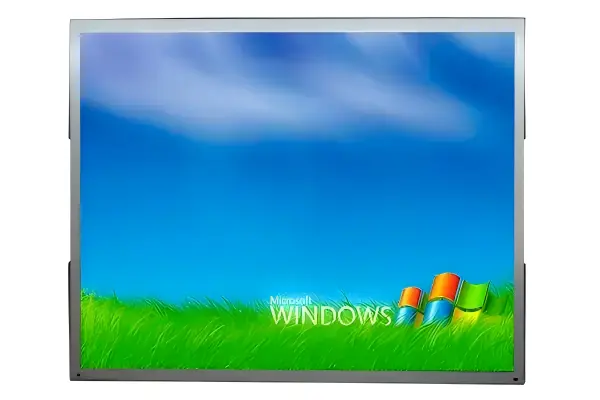
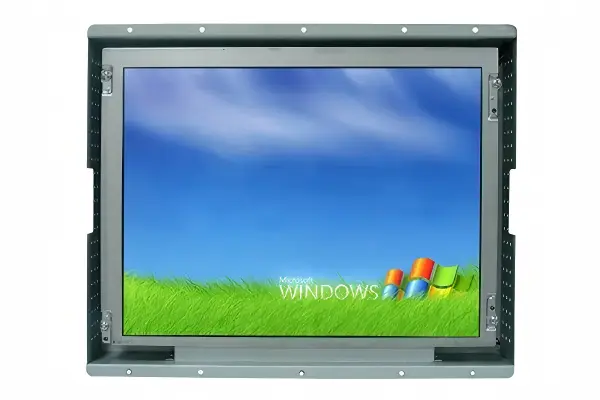
An open frame monitor is an industrial display module built for direct integration into equipment, kiosks, enclosures, and control systems. Unlike a finished desktop monitor, it ships without a full outer housing, so you can mount it inside a machine or cabinet with a custom bezel, bracket, or front panel.
This format is popular when you need a bezel-free display appearance, a compact footprint, or a specific mechanical fit. It also gives you more control over LCD panel integration, touch layers, cable routing, and service access.
For OEMs and system integrators, the value is clear: the display becomes part of the product, not a separate accessory.
For a factory-maintained comparison of the LH and LD open frame series — sizes 6.5" to 19", brightness up to 1500 nits, touch and interface options — see the Open Frame Monitor Guide.
How Open Frame Monitor Architecture Works
An open frame monitor combines several layers into one integrated assembly. Think of it as a display “core” surrounded by the mounting and electronics needed to make it work inside a machine.
Main building blocks
| Component | Function | Design impact |
|---|---|---|
| LCD panel | Produces the image | Sets resolution, brightness, viewing angle, and size |
| LCD controller board | Converts input signals to panel drive signals | Determines interface support such as HDMI, DP, VGA, or LVDS |
| Metal frame chassis | Supports the panel and electronics | Affects rigidity, mounting method, and serviceability |
| Touch screen overlay | Adds user input function | Changes optical stack-up, thickness, and glove compatibility |
| Cover glass or front lens | Protects the display surface | Influences durability, cleanability, and appearance |
| Cabling and harnesses | Carry power, video, and touch signals | Impacts EMI control and installation space |
The metal frame chassis is especially important in industrial use. It provides structural support, helps keep alignment stable, and gives you defined mounting points for custom mounting inside an enclosure.
Signal path and control logic
The controller board receives video input from the host system and converts it into the format required by the LCD panel. In embedded systems, this board is often the bridge between the machine controller and the display.
Common input options include:
- HDMI for broad compatibility
- DisplayPort for higher-resolution systems
- VGA for legacy equipment
- LVDS or eDP for embedded integration
If the design uses a touch layer, the touch controller sends input data back to the host through USB or another interface. This creates a complete embedded display subsystem rather than a standalone monitor.
Key Design Benefits and Trade-offs
An open frame monitor offers flexibility, but that flexibility comes with engineering responsibilities. You gain control over the mechanical and electrical design, yet you must manage integration details that a finished monitor already hides.
Why engineers choose this format
- Space efficiency: the monitor fits into tight enclosures and custom panels
- Visual integration: a bezel-free display can match the machine front panel
- Customization: brightness, touch type, interface, and mounting can be tailored
- Service access: internal installation can simplify replacement in modular equipment
- System consistency: the display can be matched to the product’s industrial design
Trade-offs to plan for
- You must define the mounting interface early
- Heat dissipation needs more attention than in a sealed consumer monitor
- Cable routing can affect EMI and assembly time
- Touch and glass layers can introduce reflection or parallax if not specified carefully
- Mechanical tolerance stack-up matters more during LCD panel integration
The best results come from treating the display as part of the machine architecture, not as a last-minute accessory.
Thermal, Optical, and Mechanical Considerations
Open frame designs often run inside cabinets, kiosks, or equipment panels where airflow is limited. That makes thermal management a core design topic.
Thermal management priorities
- Confirm the operating temperature range of the LCD panel and controller board
- Check whether the enclosure uses passive cooling, forced air, or conduction paths
- Leave clearance around heat-generating components
- Avoid placing the controller board near power modules or hot drives
- Validate performance at the highest expected ambient temperature
A display that works on a bench may behave differently inside a sealed enclosure. LCD brightness, color stability, and backlight life all respond to heat.
Optical stack options
An open frame monitor may use a bare LCD, a touch overlay, or a bonded front surface. If you add a touch screen overlay, the optical stack becomes thicker and can reduce contrast or increase internal reflections.
Optical bonding helps reduce these issues by removing the air gap between layers. In environments with strong ambient light, vibration, or washdown exposure, bonding can improve readability and mechanical stability.
Mounting and fit-up
The mounting strategy must match the enclosure geometry and service plan. Common approaches include:
- Rear brackets for panel integration
- Side flanges for frame attachment
- VESA mount interfaces for modular equipment layouts
- Custom rails or captive fasteners for field replacement
A VESA mount is useful in some embedded projects, but it is not always the most space-efficient option. For compact industrial systems, a custom mounting scheme often gives better control over depth, alignment, and cable exit direction.
Industrial Applications and Selection Criteria
Open frame monitors appear in many industrial systems where the display must be integrated into a larger machine.
Common applications
- Factory automation HMIs
- Kiosks and self-service terminals
- Test and measurement equipment
- CNC and process control cabinets
- Transportation consoles
- Retail and ticketing terminals
- Medical and laboratory instruments
Selection checklist
| Selection factor | What to verify | Why it matters |
|---|---|---|
| Panel size and aspect ratio | Match the enclosure opening and user workflow | Prevents layout conflicts |
| Brightness | Check ambient light conditions and viewing distance | Affects readability |
| Viewing angle | Confirm operator position and installation height | Reduces image shift |
| Touch technology | PCAP, resistive, or no touch | Impacts gloves, durability, and interface behavior |
| Controller board inputs | HDMI, DP, VGA, LVDS, eDP | Ensures system compatibility |
| Mounting method | Flange, bracket, VESA, custom frame | Affects assembly and serviceability |
| Thermal limits | Ambient range and heat dissipation path | Supports 24/7 operation |
| Optical stack | Air gap or optical bonding | Influences clarity and durability |
| EMC requirements | CE, FCC, IEC-related system needs | Important in industrial environments |
If your design includes a touch layer, evaluate whether a touch screen overlay should be paired with optical bonding. In dusty or high-vibration environments, that combination can improve durability and user experience.
Typical Specification Ranges for Open Frame Integration
| Specification | Common industrial range |
|---|---|
| Screen size | 8" to 24" |
| Brightness | 250 to 1000 nits, higher for bright environments |
| Operating temperature | -20°C to 70°C in many industrial models |
| Viewing angle | 178°/178° for IPS panels |
| Contrast ratio | 1000:1 to 3000:1 |
| Touch options | PCAP or resistive |
| Mounting styles | Bracket, flange, VESA, custom mounting |
| Input interfaces | HDMI, DP, VGA, LVDS, eDP |
These ranges are common starting points. The final specification should match enclosure depth, operator distance, and expected ambient conditions.
When your application needs a specification outside these ranges — custom mounting, unusual screen sizes, brightness above 1000 nits, or special interfaces — an OEM/ODM custom display project lets you start from a proven open frame reference design and adapt it to your exact requirements without a from-scratch development effort.
Frequently Asked Questions
Q: What is the main difference between an open frame monitor and a panel mount monitor?
An open frame monitor is designed for internal integration into a system, while a panel mount monitor is built to sit flush in a front panel with a finished bezel. Open frame units give you more mechanical flexibility, especially when you need a custom enclosure or embedded display layout. Panel mount designs are better when the front face must remain sealed and visually finished.
Q: Do open frame monitors always need a controller board?
Yes, in most integration projects the LCD panel requires a controller board to convert the host video signal into the panel’s native drive format. The board also manages power sequencing and, in some designs, touch communication. Without it, the panel cannot operate as a complete industrial display module.
Q: When should optical bonding be added to an open frame monitor?
Optical bonding makes sense when readability, vibration resistance, or surface durability matter more than lowest cost. It is often used in outdoor kiosks, transport systems, and harsh industrial environments. If the display sits behind cover glass and faces bright ambient light, bonding can improve contrast and reduce internal reflections.
Q: Is VESA mount the right choice for every open frame project?
No. VESA mount works well for some modular systems, but it can consume more space than a custom frame or rear-bracket design. For compact embedded equipment, custom mounting usually gives better control over depth, cable routing, and service access.
Explore Our Open Frame Monitors
6.5" to 19" open frame LCD panels with VGA/DVI/HDMI/DP inputs, wide temperature support, and custom mounting brackets. Free sample, no MOQ.
View Open Frame Monitors →