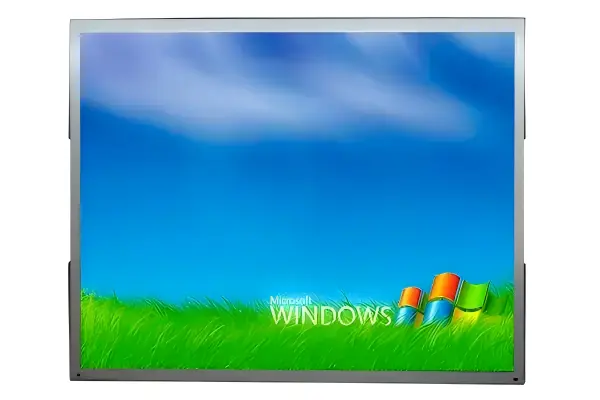
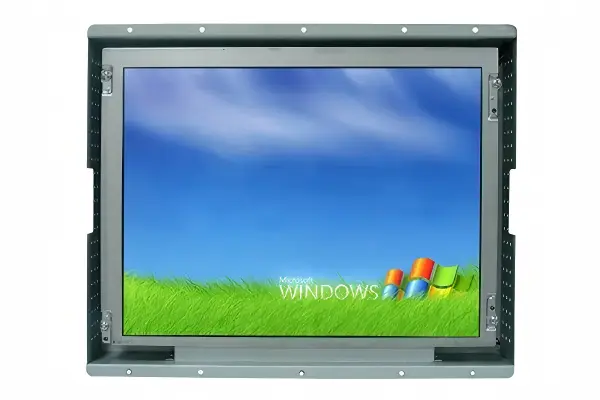
An open frame monitor can seem like a simple display without a finished outer case, but that description often leads buyers toward the wrong selection criteria. When a monitor does not match the enclosure, interfaces, or installation conditions of a machine, integration delays can follow. I recommend evaluating it first as an internal machine component, not as a standalone screen.
An open frame monitor is an integration-oriented display designed to be installed inside a customer-built enclosure, kiosk, vending machine, terminal, or industrial equipment panel. Unlike a desktop monitor, it usually relies on the final machine for external protection, mounting structure, cooling, and appearance[1]. Buyers should confirm mechanical fit, video and power compatibility, touch requirements, and service access before requesting a quotation.
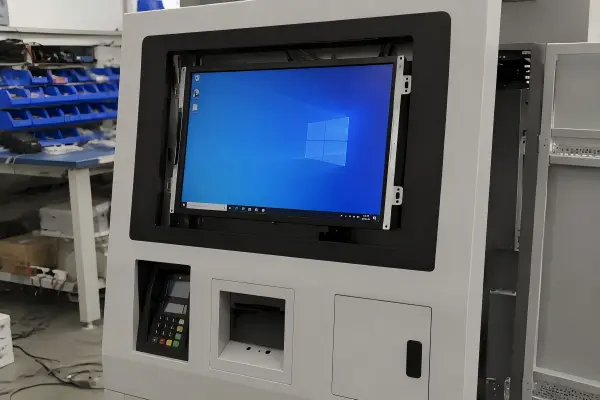
In my pre-sales discussions at AplusLCD, I often see customers begin with screen size, resolution, and price. Those details matter, but they come after the more important question: can the display integrate reliably into the finished machine? The following guide explains how I help B2B buyers assess that decision.
For a one-page factory comparison of the AplusLCD open frame range — available sizes, brightness options, interfaces, and touch — see the Open Frame Monitor Guide.
What Is an Open Frame Monitor Designed to Do?
A display that looks correct in a product catalog can still become difficult to install in a real terminal. Buyers may assume that removing the housing makes any monitor easier to integrate, yet mounting, front-panel sealing, and internal clearances can create unexpected problems. An open frame design solves those issues only when the machine structure is planned around it.
An open frame monitor is designed to become part of another product rather than operate as a finished standalone display. It typically includes an LCD panel, controller board, metal frame, mounting provisions, and optional touch screen, while the buyer’s enclosure provides the final external housing, protection, and visual finish.
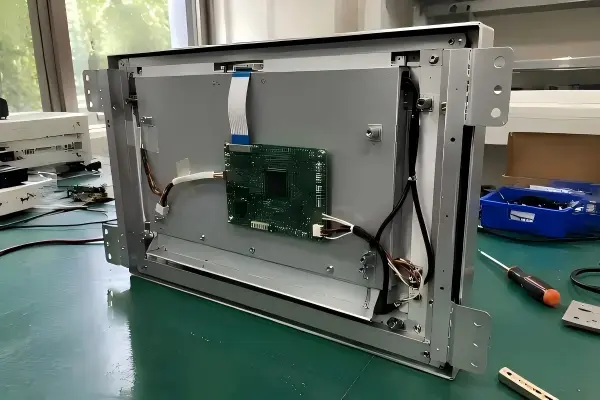
An integration component, not a desktop monitor
I describe an open frame display as a building block for a finished machine. It is commonly installed behind a front panel, glass window, bezel, or custom metal enclosure. The final product may be a self-service ordering terminal, ticketing kiosk, vending machine, industrial controller, medical device interface, or information terminal.
A typical open frame assembly may include:
- LCD panel and backlight system
- Metal chassis or supporting frame
- Display controller board
- Video input ports
- Power input connection
- Optional projected capacitive (PCAP) or resistive touch screen
- Mounting ears, brackets, side holes, or VESA mounting options
- Optional protective glass or front-facing bezel structure
The key difference is where responsibility sits. A finished industrial monitor often includes an enclosure, rear cover, external connectors, and a defined mounting format. An open frame monitor is intentionally more exposed because it is meant to sit inside another assembly.
I advise buyers not to assume that an open frame structure has the same final-machine protection as an enclosed industrial monitor. The monitor may support a certain configuration, but the completed product’s protection level depends on enclosure design, sealing, cable routing, ventilation, and installation quality. IP protection ratings apply only to the specific tested assembly — they do not automatically transfer from a component to the finished machine.
Common applications for open frame displays
An open frame monitor can work well when the equipment manufacturer wants control over the outer appearance, dimensions, branding, and installation layout. I commonly discuss this format with customers building:
- Kiosks and self-service terminals
- Vending machines
- Restaurant ordering systems
- Queue management terminals
- Retail information displays
- Industrial automation equipment
- Machine control panels
- Transportation information terminals
- Custom digital signage units
- Laboratory or medical equipment interfaces
For example, a kiosk manufacturer may require a 21.5-inch touch display behind tempered glass with a branded black border. An open frame monitor can provide the display and touch function, while the kiosk manufacturer controls the cabinet, payment-module layout, printer opening, speaker area, and service door.
That flexibility is valuable, but it also means the buyer must manage the wider integration process. I always encourage project teams to review the monitor drawings alongside the enclosure drawings before production decisions are finalized.
How Do You Check Open Frame Monitor Mechanical Compatibility?
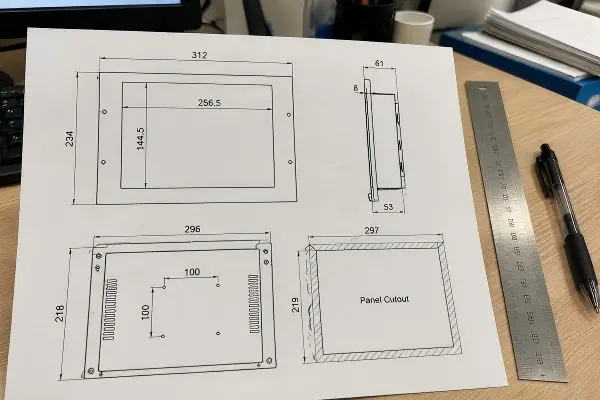
A monitor may have the right diagonal size but still fail to fit because the active area, outer dimensions, mounting holes, rear depth, or cable position conflicts with the enclosure. This is a frequent source of late-stage redesign. Mechanical compatibility should be the first practical filter in an open frame monitor evaluation.
To check open frame monitor mechanical compatibility, buyers should compare the monitor drawing with the enclosure opening, internal depth, mounting method, bezel design, connector clearance, and service space. The visible area must align with the front opening, while the rear assembly must fit without blocking cables, boards, cooling paths, or maintenance access.
Start with the front-panel structure
The front panel is often the most visible part of a kiosk or industrial machine. I recommend that buyers define whether the display will sit:
- Behind a glass or acrylic cover
- Behind a metal bezel with an exposed active area
- Flush with a front panel
- Inside a recessed installation
- With a touch panel exposed to the user
Each arrangement affects the display selection. For example, a PCAP touch screen may need a specific cover-glass thickness and bonding arrangement to maintain touch sensitivity[2]. A display behind additional protective glass may also require brightness evaluation because each layer can reduce visible light transmission[3].
Review the dimensions that screen size does not reveal
A 15.6-inch display from two suppliers can have different outer dimensions, active areas, controller locations, and mounting configurations. I suggest buyers request a mechanical drawing early, not after choosing a nominal screen size.
| Mechanical item | Why it matters | Buyer action |
|---|---|---|
| Enclosure opening | Determines visible area alignment | Compare with active area and viewing area |
| Overall monitor width and height | Determines whether the unit fits internally | Check against inner cabinet dimensions |
| Total installation depth | Prevents interference with internal parts | Include cable bend radius and airflow space |
| Mounting holes or brackets | Determines fixing method | Confirm hole position, thread type, and load support |
| Controller board location | Affects clearance and cable routing | Review rear-view drawing |
| Connector direction | Affects serviceability | Allow space for HDMI, DP, USB, and power cables |
| Front bezel or edge structure | Affects appearance and sealing | Match it to the front-panel design |
Plan for installation and service access
I have seen a common pattern in early selection conversations: the display fits the opening, but the installer cannot reach a connector or remove the unit without dismantling half the machine. That issue is not a monitor defect. It is an integration planning gap.
Buyers should consider:
- Can a technician access the power and video connectors after installation?
- Can the display be removed from the front or rear?
- Is there enough room to tighten mounting hardware?
- Does the cabinet allow cable bend radius?
- Can the touch USB cable reach the host system?
- Can a failed display be replaced without removing unrelated modules?
A mechanically fitting open frame monitor is only the beginning. The finished terminal must also support practical assembly, inspection, maintenance, and replacement over its intended service life.
What System Connections Must an Open Frame Monitor Support?
Many integration problems appear after the display has been mounted successfully. A buyer may discover that the host computer has the wrong video output, the power supply does not meet the requirement, or the touch controller is not recognized as expected. A successful installation needs electrical and system compatibility as well as correct dimensions.
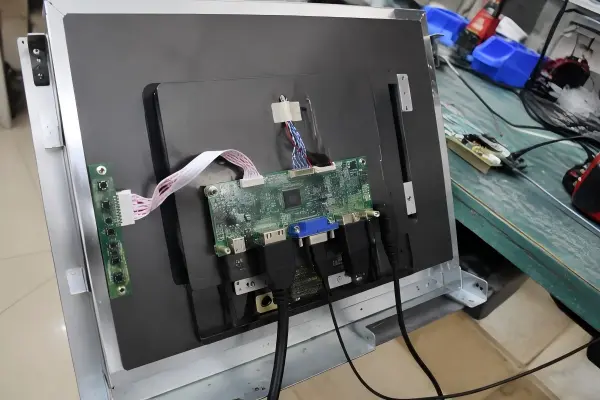
An open frame monitor must match the host system’s video output, power conditions, touch interface, controller arrangement, and operating software environment. Buyers should verify connector types, voltage range, power consumption, cable lengths, USB touch support, and signal compatibility before approving a display for a machine design.
Video input and controller compatibility
Open frame displays may support HDMI, DisplayPort, VGA, DVI, LVDS, eDP, or other interfaces depending on the selected configuration. The correct choice depends on the host computer, embedded board, media player, or industrial controller.
I recommend that buyers confirm these points:
- Available host video output type
- Required display resolution
- Signal timing compatibility
- Number of displays connected to the host
- Required cable length inside the machine
- Need for locking connectors or custom cable routing
- Display orientation, such as landscape or portrait
- Boot-screen visibility and BIOS compatibility where relevant
A screen that supports Full HD resolution, for example, may still need confirmation that the host system can output the required resolution and refresh rate through the selected interface. The controller board also needs a protected and accessible location within the equipment.
Power conditions deserve equal attention
Power is sometimes treated as a minor specification, but it can affect the whole terminal design. The monitor may require a specific DC input, an external adapter, or a particular power range. The total power budget becomes more important with larger displays, high-brightness backlights, touch functions, and multiple peripherals[4].
I suggest checking:
| Electrical consideration | Why buyers should verify it |
|---|---|
| Input voltage | Must align with the machine’s available power rail |
| Peak and typical power use | Helps size the system power supply |
| Startup behavior | Helps assess power sequencing and system boot behavior |
| Grounding arrangement | Supports safer equipment integration |
| Connector type | Must suit internal wiring and service access |
| Cable length | Must reach without strain or unsafe routing |
Touch integration is a separate decision
Touch capability is not automatically included just because a screen is intended for kiosks. Buyers should specify the desired touch technology, number of touch points, front-panel structure, and host operating system requirements.
For many public-facing applications, PCAP touch is selected because it supports responsive multi-touch interaction[5] and can work through appropriately designed cover glass. However, performance depends on the complete stack-up, not only on the monitor. Glass thickness, border treatment, water exposure, gloves, electrical noise, and enclosure grounding can all influence the final experience[6].
I recommend qualified engineering review for application-specific touch behavior, especially for outdoor terminals, wet environments, medical applications, or machines with unusual front-panel materials.
When Should You Choose an Open Frame Monitor Instead of an Enclosed Monitor?
Some buyers choose an open frame solution because it appears lower cost or more flexible, then find that their project would benefit from a ready-to-install enclosed unit. Other buyers select a finished monitor even though they need a custom front panel and internal layout. The right choice depends on the amount of integration control the machine requires.
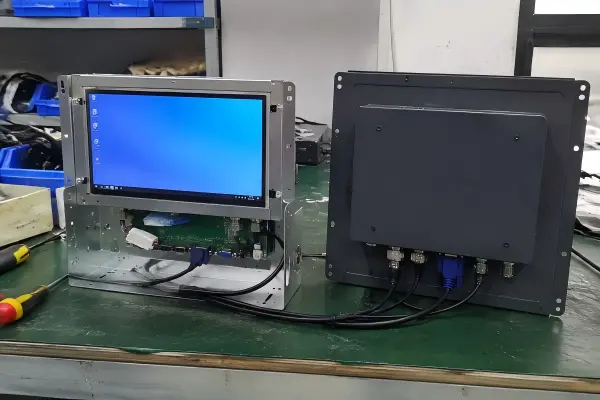
Choose an open frame monitor when the display must sit inside a custom enclosure and the project team can manage mounting, protection, cooling, and system connections. Choose an enclosed monitor when faster installation, a finished housing, standard mounting, and reduced enclosure design work are more important than full mechanical customization.
When open frame construction is a strong fit
I usually recommend considering an open frame structure when the display is a central part of a custom-built product. This approach gives the equipment maker more control over appearance and internal packaging.
An open frame format may be appropriate when:
- The machine has a custom metal, plastic, or stainless-steel enclosure
- The product needs a branded front appearance
- The screen must align precisely with a cabinet opening
- The project needs a specific mounting arrangement
- A touch screen must be integrated behind custom cover glass
- Internal space is limited and must be designed carefully
- The buyer needs configuration options for brightness, touch, interfaces, or frame design
At AplusLCD, I see this need often in kiosk and self-service terminal projects. A product team may need a 10.1-inch display for a compact payment terminal, a 15.6-inch touch display for an ordering interface, or a larger screen for an information kiosk. In each case, the mechanical design drives the display discussion.
When an enclosed monitor may reduce risk
An enclosed industrial monitor can be more suitable when the buyer does not need to build the display into a custom front panel. It may reduce fabrication work and simplify the installation process.
| Project condition | Open frame approach | Enclosed monitor approach |
|---|---|---|
| Custom kiosk front panel | Often suitable | May be less flexible |
| Standard wall or arm mounting | May require extra design | Often simpler |
| Need for a finished rear housing | Requires customer enclosure | Usually included |
| Fast pilot deployment | May require more integration work | Can reduce installation steps |
| Harsh environment protection | Depends on final machine design | May offer a defined product structure to evaluate |
| Branded terminal appearance | Supports custom design | May limit appearance options |
The selection should not be based on a general statement that one format is “better.” I recommend comparing the total integration effort, not only the monitor purchase price. The cost of enclosure modifications, brackets, wiring, protective glass, thermal management, and service procedures can change the final project economics.
What Should Buyers Prepare Before Requesting an Open Frame Monitor Quotation?
A vague request such as “please quote a 21.5-inch touch display” can produce a quotation, but it may not produce the right solution. Missing details force suppliers to make assumptions, and assumptions can lead to revisions later. A clearer pre-quotation brief improves both selection speed and technical accuracy.
Before requesting an open frame monitor quotation, buyers should provide enclosure opening dimensions, available internal space, mounting requirements, front-panel design, touch needs, video interface, power conditions, and operating environment. I also recommend sharing drawings, photos, or renderings when available because they reveal integration constraints that a size request alone cannot show.

Practical pre-quotation checklist
I use questions like these to move a discussion from a general display inquiry to a more useful technical evaluation:
Mechanical requirements
- What is the required visible area and enclosure opening size?
- What are the maximum outer width, height, and depth?
- Is the monitor installed from the front or rear?
- What fixing method does the enclosure support?
- Is there a required bezel width or front-panel appearance?
- Is protective glass part of the machine design?
- How will the unit be accessed for maintenance?
Display and touch requirements
- What screen size and aspect ratio are preferred?
- What resolution is required by the application interface?
- Is standard indoor brightness sufficient?
- Does the application need higher brightness due to ambient light?
- Is touch required?
- Does the user need single touch or multi-touch?
- Will users wear gloves or interact through cover glass?
Electrical and system requirements
- Which video output does the host system provide?
- What power source is available in the machine?
- Does the system need USB touch connectivity?
- What operating system and host hardware will be used?
- Are there cable-length or connector-orientation limits?
- Is portrait orientation required?
Environment and final-machine considerations
- Is the terminal used indoors, semi-outdoors, or outdoors?
- What temperature range should the final equipment support?
- Is the machine exposed to dust, vibration, moisture, cleaning agents, or direct sunlight?
- How will the enclosure manage heat from the display and other electronics?
- What protection level does the completed machine need?
Verify documents and production details
For regulated or application-sensitive industries, buyers should request and verify the documents relevant to their own procurement process. Requirements may include material declarations, safety documentation, environmental compliance information, drawings, inspection standards, or other records appropriate to the final product and destination market.
I do not treat a monitor specification sheet as a complete approval for a finished machine. The system builder remains responsible for evaluating the final enclosure, electrical design, thermal performance, user safety, and applicable regulatory requirements. Qualified professionals should review application-specific decisions before production release.
Frequently Asked Questions
Is an open frame monitor the same as a panel mount monitor?
Not always. An open frame monitor is generally designed for internal integration into another enclosure. A panel mount monitor usually includes a front bezel or mounting structure intended to install through a panel opening. Some products may combine these characteristics, so I recommend reviewing the mechanical drawing rather than relying only on category names.
Can I use an open frame monitor outdoors?
An open frame monitor may be used within an outdoor machine, but the monitor itself does not automatically make the final terminal outdoor-ready. Buyers must evaluate enclosure sealing, sunlight readability, heat management, condensation, cable protection, and temperature exposure. I recommend application-specific engineering review for outdoor use.
Does an open frame monitor include touch screen capability?
Some open frame monitor configurations include touch, while others do not. Buyers should specify whether they need PCAP touch, resistive touch, protective glass, USB touch output, and multi-touch support. The final enclosure and cover-glass design can affect touch performance, so the full assembly should be evaluated.
What information should I send to an open frame monitor supplier?
I recommend sending the target screen size, enclosure opening dimensions, available depth, mounting method, front-panel drawing, required brightness, touch preference, video input, power conditions, operating environment, and expected order volume. A photo, CAD drawing, or enclosure rendering can make the selection discussion much more efficient.
Does a correct mechanical fit guarantee compatibility?
No. Mechanical fit only confirms that the monitor can be placed in the enclosure. Buyers must still verify video signal compatibility, power requirements, touch connection, controller placement, host-system support, cable routing, cooling, and final-machine protection. These checks reduce the risk of installation or commissioning issues.
Conclusion
An open frame monitor is best understood as a display component for integration, not simply as an uncovered monitor. I encourage buyers to begin with enclosure structure: opening size, internal depth, fixing points, front-panel design, and service access. Then they should verify video, power, touch, controller, and environmental requirements. At AplusLCD, we help B2B teams evaluate open frame monitor configurations for kiosks, self-service terminals, vending machines, and industrial equipment. Share your drawings and application requirements with us to begin a practical selection discussion.
Related Reading
Footnotes
-
"CHARACTERIZING THE THERMAL EFFECTS OF HIGH ...", https://tsapps.nist.gov/publication/get_pdf.cfm?pub_id=919048. Engineering guidance on electronic enclosures recognizes that enclosure geometry, sealing, mounting, and ventilation influence both environmental protection and thermal performance of installed equipment. Evidence role: mechanism; source type: institution. Supports: An engineering or standards source should explain that enclosure construction, ventilation, sealing, and mounting affect equipment protection and heat dissipation.. Scope note: This support addresses enclosure effects generally; the resulting performance of a specific monitor installation depends on the complete machine design and validation. ↩
-
"Review of Capacitive Touchscreen Technologies - PMC - NIH", https://pmc.ncbi.nlm.nih.gov/articles/PMC8309784/. Research on projected-capacitive sensing shows that cover-lens thickness and the dielectric and geometric properties of the sensor stack influence signal coupling and touch-detection performance. Evidence role: mechanism; source type: paper. Supports: A paper should document how cover-lens thickness, dielectric properties, sensor design, and bonding affect projected-capacitive touch detection.. Scope note: The acceptable thickness and bonding configuration are controller- and sensor-specific and should be verified for the intended assembly. ↩
-
"optical performance of random anti-reflection", https://ninercommons.charlotte.edu/record/3471/files/Taylor_uncc_0694D_11267.pdf. Optics references explain that glazing and other transparent layers introduce reflection and absorption losses, reducing total transmitted light unless mitigated through material selection or optical coatings. Evidence role: mechanism; source type: education. Supports: An optics source should establish that glass and layered interfaces transmit less than all incident light because of reflection and absorption losses.. Scope note: The magnitude of loss depends on glass composition, thickness, coatings, air gaps, and the number of interfaces. ↩
-
"Liquid crystal display and organic light-emitting diode ... - PMC", https://pmc.ncbi.nlm.nih.gov/articles/PMC6060049/. Studies of LCD energy use identify backlight operation as a major power component and show that higher luminance settings generally require greater backlight power. Evidence role: mechanism; source type: paper. Supports: A source should show that LCD backlight power is a significant contributor to display energy use and increases with luminance requirements.. Scope note: Total terminal power also depends on panel size, controller efficiency, touch technology, host hardware, duty cycle, and connected peripherals. ↩
-
"Review of Capacitive Touchscreen Technologies - PMC - NIH", https://pmc.ncbi.nlm.nih.gov/articles/PMC8309784/. Projected-capacitive touch systems use capacitive sensor arrays that can identify multiple simultaneous contact locations, enabling multi-touch interaction. Evidence role: mechanism; source type: paper. Supports: A research source should explain that projected-capacitive sensor arrays can detect multiple simultaneous touch locations.. Scope note: Responsiveness and the supported number of touch points depend on the sensor, controller, firmware, operating system, and application implementation. ↩
-
"Explained: How Touchscreens Work", https://www.designreview.byu.edu/collections/explained-how-touchscreens-work. Capacitive-touch research and application studies report that conductive liquids, glove materials, electromagnetic interference, and grounding conditions can alter capacitive sensing signals and affect touch detection. Evidence role: mechanism; source type: paper. Supports: A source should document the effects of conductive liquids, gloves, electromagnetic interference, and grounding on capacitive touch sensing.. Scope note: The severity of these effects depends on the touch controller, sensor tuning, glove and water conditions, enclosure materials, and electromagnetic environment. ↩