Shelf edge LCD displays can look straightforward in an inquiry, yet many sample projects fail because the display was evaluated outside its real shelf environment. A screen that powers on may still create mounting, cable-routing, or service problems. We use structured sample testing and RFQ clarification to reduce those risks before pilot production.
Shelf edge LCD displays should be sampled against a defined shelf deployment, not simply powered on at a desk. Buyers should verify mechanical fit, mounting, cable exits, power and interface integration, content operation, service access, and replacement workflow in the intended shelf context. The same confirmed information should then be used to request comparable RFQs for pilot and production quantities.

The goal is not to create one universal retail-display specification. Each shelf design, content system, store environment, and rollout plan has different constraints. However, a disciplined process helps our customers turn an incomplete display inquiry into requirements that engineering, procurement, and suppliers can all evaluate.
How Should Buyers Define Shelf Edge LCD Displays Before Sampling?
Many RFQs begin with a screen size and quantity, such as “10-inch display, 500 pieces.” That information starts a conversation, but it does not define a usable product. Without deployment details, buyers can receive samples or quotations that appear similar while having major integration differences.
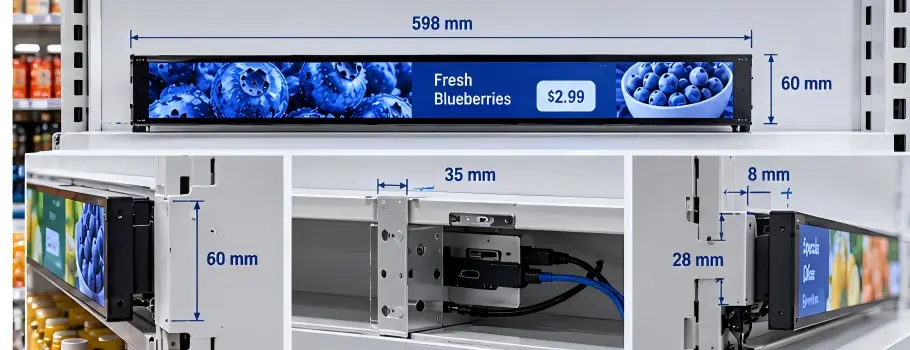
Before ordering shelf edge LCD displays, buyers should define the intended shelf structure, available installation space, mounting method, cable path, power source, interface, operating conditions, and expected rollout quantity. This deployment definition gives suppliers a practical basis for feasibility review, sample configuration, and comparable pricing.
Move Beyond Screen Size and Quantity
In our RFQ exchanges with retail-equipment OEMs and shelf-system brands, we often see the same missing inputs. The buyer may know the display diagonal but not the usable front opening, rear depth, bracket position, or connector clearance.
Those details can change the recommended housing, panel orientation, cable length, controller board arrangement, and manufacturing cost.
A practical RFQ should describe the deployment, including:
- Shelf type: metal gondola, refrigerated shelf, wood fixture, acrylic rail, custom retail unit, or another structure.
- Available space: front width, height, rear depth, and nearby obstructions.
- Mounting method: VESA, side brackets, custom clips, rail insertion, adhesive support, or panel cutout.
- Display orientation: landscape, portrait, angled, or mixed orientation.
- Cable routing: rear exit, side exit, hidden channel, daisy-chain route, or external conduit.
- Power input: 12 V, 24 V, USB-C, PoE, or site-specific power architecture.
- Signal and control: HDMI, USB, Ethernet, Android player, Windows host, serial control, or networked CMS requirements.
- Environment: indoor temperature, dust exposure, lighting, cleaning procedures, and possible vibration.
- Commercial plan: sample quantity, pilot quantity, forecast volume, branding needs, and target delivery window.
I have seen clarification questions save time because they reveal a basic conflict early. For example, a rear-facing connector may be technically correct but physically impossible when a shelf sits close to a wall. That is not administrative friction. It is an integration variable that should be resolved before the sample is built. The shelf edge display solutions page shows the rail and enclosure patterns these configurations are normally built for.
| RFQ Input | Why It Matters During Evaluation |
|---|---|
| Shelf drawing or photos | Supports fit and mounting review |
| Front and rear clearance | Affects housing depth and connector access |
| Cable-exit direction | Determines installation practicality |
| Power and interface details | Affects board selection and wiring design |
| Pilot and rollout volume | Helps buyers compare tooling, unit pricing, and lead-time assumptions |
How Should Shelf Edge LCD Displays Be Tested for Mechanical Fit?
A sample can show good image quality and still be unsuitable for production deployment. Mechanical fit should be the first sample-test gate because poor mounting or inaccessible connectors can create rework across every shelf location.
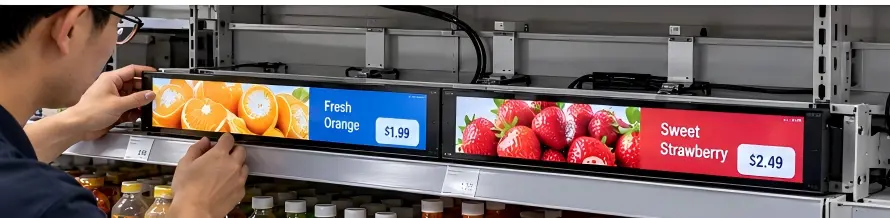
Shelf edge LCD displays should be installed in the actual or representative shelf assembly during sampling. Buyers should verify mounting stability, opening dimensions, bracket alignment, cable clearance, connector access, display viewing angle, and the steps needed to remove and replace the unit.
Test the Installation, Not Only the Screen
We recommend that buyers treat the shelf, bracket, cable, power source, and display as one assembly. A bench test can confirm that the LCD powers on. It cannot confirm that an installer can mount it efficiently or that a technician can replace it without dismantling adjacent hardware.
During sampling, a buyer should document the installation sequence:
- Position the shelf edge LCD display in the intended location.
- Install the specified brackets, clips, or mounting hardware.
- Connect power and signal cables through the planned route.
- Confirm that the cable bend radius and connector body fit without strain.
- Check whether adjacent products, price rails, or shelf components interfere.
- View the display from normal shopper and staff positions.
- Remove and reinstall the unit using the planned service procedure.
Questions That Often Reveal Rework Risk
Mechanical testing should answer practical questions, not only dimensional questions:
- Can the installer reach the fasteners after the shelf is assembled?
- Does the cable exit collide with the shelf backboard?
- Is there enough room to unplug a connector?
- Does the display protrude beyond the intended shelf profile?
- Can one technician replace the unit, or does the workflow require removing neighboring parts?
- Does the selected housing leave sufficient clearance for heat dissipation where required?
AplusLCD works with industrial and commercial display configurations, including customized housings, brightness levels, touch options, power inputs, and mounting approaches. However, buyers should verify application-specific fit during sampling. A drawing review and a physical installation test serve different purposes. Both are useful before a pilot order.
How Can Buyers Turn Sample Results Into Comparable RFQs?
A good sample test creates decision-ready information. A weak sample test produces comments such as “looks good” or “needs adjustment,” which are difficult to price, reproduce, or compare between suppliers.
After testing shelf edge LCD displays, buyers should convert findings into prioritized, measurable requirements for the pilot RFQ. The RFQ should distinguish mandatory fit and integration requirements from preferred visual, cosmetic, and commercial options so suppliers can quote on a comparable basis.

Record What Changed and Why
We encourage buyers to maintain a simple revision record after each sample review. This record should identify the issue, its deployment impact, the requested change, and the priority level.
| Sample Finding | RFQ Requirement | Priority |
|---|---|---|
| Rear connector cannot fit | Cable must exit from the side or use an angled connector | Mandatory |
| Display sits too proud of shelf | Maximum front projection to be confirmed on drawing | Mandatory |
| Screen is difficult to read under store lighting | Brightness target and lighting condition to be evaluated | Application-specific |
| Housing finish differs from fixture | Color, logo, and surface-finish requirement | Preferred |
| Replacement requires two people | Service-access requirement and removal sequence | Mandatory |
Separate Requirements by Decision Impact
This approach prevents a common procurement mistake: treating every comment as equally important. Buyers should separate requirements into three groups:
- Mandatory: Requirements that affect safety, physical fit, electrical integration, installation, serviceability, or contractual deployment needs.
- Preferred: Features that improve appearance, user experience, or purchasing convenience but may be negotiable.
- To be verified: Conditions that require further sample testing, site review, or qualified engineering assessment.
I find that this structure also improves quote comparison. A lower unit price may reflect a different cable assembly, housing material, brightness option, packaging method, or testing scope. Buyers should ask suppliers to state assumptions clearly instead of comparing only a headline price. Where the shelf format is a long, narrow strip rather than 16:9, the stretched bar LCD display platform is the hardware most often configured for these deployments — comparing its published options against your sample findings is usually the fastest way to see which assumptions changed.
For production sourcing, buyers should also request relevant quality and compliance documents where required by the target market. Documents such as CE, FCC, RoHS, REACH, ISO 9001, or other records should be reviewed for applicability to the actual product configuration and destination. Certification needs should be confirmed by the buyer’s qualified compliance team where necessary.
Frequently Asked Questions
What is the most important sample test for shelf edge LCD displays?
Mechanical installation is usually the first priority. Buyers should confirm mounting, cable routing, clearances, connector access, and replacement steps in an actual or representative shelf assembly. A successful power-on test alone does not demonstrate deployment readiness.
What should be included in a shelf-edge display RFQ?
A useful RFQ should include shelf drawings or photos, installation dimensions, mounting method, cable-exit direction, power and signal requirements, environmental conditions, sample or pilot quantity, forecast volume, and required documentation. Buyers should also identify mandatory versus preferred requirements.
Why do suppliers ask so many clarification questions?
Supplier questions often identify unspecified variables that affect feasibility, cost, lead time, or installation risk. Questions about brackets, connector direction, cable length, and shelf clearance can prevent buyers from receiving an unusable sample or non-comparable quotations.
Can one sample validate a full retail rollout?
One sample can support early fit and integration learning, but it should not be treated as proof of every site condition or production outcome. Buyers should define pilot testing based on their shelf variations, content system, store environment, maintenance plan, and rollout scale.
Conclusion
Shelf edge LCD displays should be evaluated as part of a complete shelf deployment rather than as standalone screens. We recommend that buyers define the installation context, test mechanical fit first, document sample findings, and convert confirmed requirements into a prioritized RFQ. This process helps reduce integration and quote-comparison risk before pilot or production orders. If you are preparing a shelf-edge display project, our AplusLCD team can help review your drawings, sample requirements, and customization feasibility.