HD starts at 720p (1280 × 720). FHD is 1080p (1920 × 1080). UHD means 4K — 3840 × 2160 — and in commercial displays that is what the label almost always means in practice. So UHD is not "a slightly better HD". It is 4× the pixels of 1080p and 9× the pixels of 720p, and it costs proportionally more in panel price, player capability and data.
The honest answer to "which do you need" is that the resolution is decided by viewing distance and by the smallest detail in your artwork, not by the label on the datasheet. We manufacture both every week at AplusLCD — 1080p is the default across our signage range, and 4K is quoted where the geometry justifies it — so this article is the same arithmetic we run with customers before quoting, not a generic comparison. If you are specifically wondering about the bottom of the ladder, we have a separate guide on what 720p resolution actually means.
The Ladder, Defined Properly
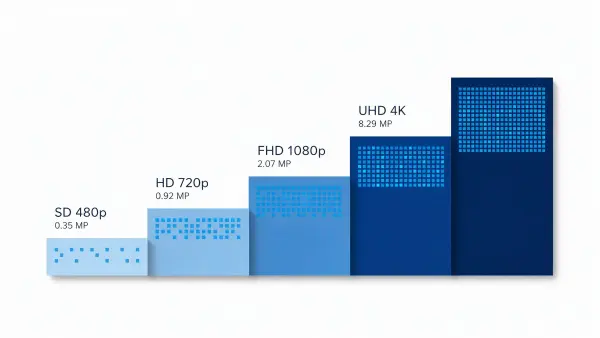
The labels get thrown around loosely, so here is the clean version:
| Label | Full name | Resolution | Total pixels |
|---|---|---|---|
| SD | Standard Definition | 720 × 480 (480p) | ~0.35 MP |
| HD | High Definition | 1280 × 720 (720p) | ~0.92 MP |
| FHD | Full High Definition | 1920 × 1080 (1080p) | ~2.07 MP |
| UHD | Ultra High Definition | 3840 × 2160 (4K) | ~8.29 MP |
Three clarifications worth making, because they cause real quoting errors:
- "HD" and "FHD" are not two separate standards. FHD is a tier inside the HD family. People say "HD" and mean 1080p; strictly, HD begins at 720p. When a tender document says "HD display", we ask which one they meant before we quote.
- UHD = 4K in commercial displays. 3840 × 2160. 8K exists and is a different conversation entirely; we do not sell it into signage because nothing in the content pipeline justifies it yet.
- SD is legacy. 480p survives in old DVDs and very low-bandwidth streams. We have not quoted an SD panel for a new signage project in years, and if a retrofit project is still running SD content, that is a content problem, not a panel problem.
One more thing the ladder hides: not every commercial display follows it. Our stretched bar displays run formats like 1920 × 158 on the 23.1" shelf-edge rail and 3840 × 720 on the 48.0" transit bar — the 48" carries more pixels than a 1080p screen. So judge by actual pixel count and viewing distance, never by diagonal inches alone. We went deep on that in the stretched bar buyer's guide.
Where the Extra Pixels Actually Show Up
The 4× jump from 1080p to 4K is only worth paying for if a human eye can resolve it, and that is purely a function of physical size and viewing distance.
First, pixel density on the sizes we actually build signage panels in:
| Screen size | PPI at 1080p | PPI at 4K |
|---|---|---|
| 32" | 69 | 138 |
| 43" | 51 | 102 |
| 55" | 40 | 80 |
| 65" | 34 | 68 |
| 86" | 26 | 51 |
And the distance at which the pixel grid stops being visible (one arcminute of visual acuity, normal corrected vision):
| Screen size | 1080p grid invisible beyond | 4K grid invisible beyond |
|---|---|---|
| 32" | ~1.3 m | ~0.6 m |
| 43" | ~1.7 m | ~0.9 m |
| 55" | ~2.2 m | ~1.1 m |
| 65" | ~2.6 m | ~1.3 m |
| 86" | ~3.4 m | ~1.7 m |
Read the 1080p column as a minimum: if nobody can get closer than that number, 4K buys nothing visible. A 65" lobby screen viewed from across a 4-metre concourse is pixel-limited at 1080p already.
Two nuances from quoting these jobs daily:
- Our own digital signage selection guide draws the 4K line at "under about 2 m". Strict acuity math on a 55" panel says nearer 1.1 m. The difference is real-world behaviour: in lobbies and shop windows people do drift up to the glass, and a screen that looks perfect from the door can look soft from half a metre. Two metres is the honest planning number, not the physics one.
- The upgrade that actually decides perceived quality outdoors usually is not resolution. Past 3–4 m, brightness beats pixels every time — which is why our budget conversations for those jobs go to high brightness panels first. We cover the trade-off in the high brightness buying guide.
Bandwidth: What UHD Actually Costs to Feed
Most articles quote consumer streaming numbers here. Those are real, but they are tuned for picture quality, and they overstate what a signage loop needs:
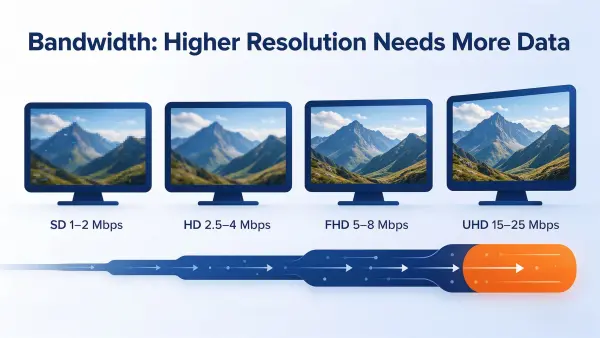
Our own signage encodes run leaner. When we prepare playback loops for customer networks we use H.264 High profile, 30 fps, 8-bit, and the figures below are what we actually set — not industry estimates:
| Content target | Native pixels | Our standard encode | Per minute | Per hour | 12-hour day |
|---|---|---|---|---|---|
| 720p | 1280 × 720 | 2.5 Mbps | ~19 MB | ~1.1 GB | ~13 GB |
| 1080p | 1920 × 1080 | 6 Mbps | ~45 MB | ~2.7 GB | ~32 GB |
| 4K UHD | 3840 × 2160 | 20 Mbps | ~150 MB | ~9 GB | ~108 GB |
The procurement-relevant column is the last one. A single 4K screen looping all day pulls roughly 108 GB per day against 32 GB at 1080p — call it 970 GB versus 3.2 TB per screen per month on a 12-hour schedule. Across a 50-screen network on metered SIMs, that difference is a line item somebody has to approve, and it is usually the number that kills the 4K plan, not the panel price.
Decoding is rarely the problem any more. The Android boards in our all-in-one LCD displays handle 4K without complaint, as do the X86 players we ship. What limits you is the uplink — and on a weak connection, adaptive bitrate will silently drop your expensive 4K schedule to something much lower anyway. We walked through that failure mode, and the local-playback fix, in the 720p guide's bandwidth section.
One rule that has no workaround: 4K content has to be authored at 4K. Feeding a 4K panel upscaled 1080p artwork buys you nothing except the invoice.
Which One Do You Actually Need?
The decision table we effectively run during quoting:
| Situation | Our call |
|---|---|
| Menu board, counter or shelf-adjacent screen, viewers inside 2 m | 1080p standard; 4K only if the artwork carries fine detail |
| 55"–86" lobby, window or brand wall where people drift close | 4K on 55" and up — this is where the pixels pay |
| Roadside or high-mounted outdoor, viewers 5 m+ | 1080p, spend the difference on brightness |
| Anything touch-driven | 1080p minimum — people lean in to touch |
| See-through showcase within arm's reach | 4K, because viewing distance is under half a metre |
| Retrofit with an existing 1080p content library | Match the library unless the library is being rebuilt anyway |
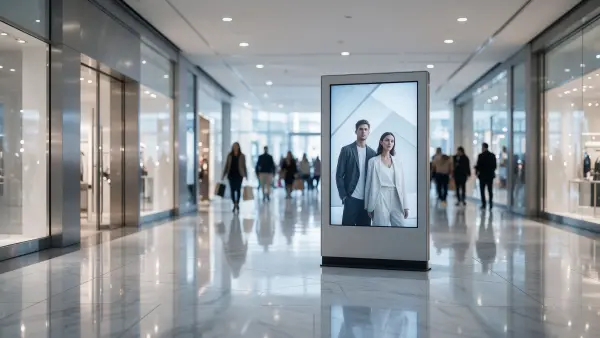
On the showcase line: our transparent LCD displays are the one product family where 4K is close to automatic, because viewers stand at museum-case distance with the panel filling their field of view. Resolution and transparency both get judged at half a metre there.
UHD vs HD on Real Signage Networks
For most commercial screens — indoor posters, menu boards, retail end caps — 1080p remains the default we quote, and we do not apologise for it. It is sharp at every distance a shopper realistically stands, every player on the market drives it, the content pipeline for it is mature, and the bandwidth bill stays sane. That is why our large size digital signage display range runs 1920×1080 or 3840×2160 across 21.5" to 86", at 250 to 3000 nits, rated 24/7, with optional built-in Android or X86 playback — you step up to 4K inside the same range when the job calls for it, not because a spec sheet said so.
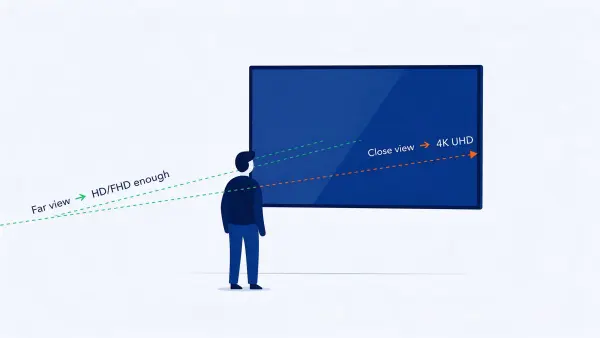
Choose 4K when the screen is large, the audience gets close, and the content is produced natively at 4K. Choose 1080p for everything else. SD, again, is for nobody starting a project in 2026.
Two Projects That Settled It for Real Customers
Both of these shipped from our plant, and both landed on 1080p — for completely different reasons, neither of which was "4K costs too much".
A 21.5" Elevator Display Where the Money Went Into Steel
An Emirati client needed an elevator display that would survive daily public use: waterproof against cleaning chemicals and condensation, vandal-proof against impact, full stainless steel housing and bezel, tempered glass front. No standard product combined all of that in the compact footprint an elevator cab allows — and there was no space behind the panel for electronics at all.
The resolution question resolved itself through geometry. People in a lift stand about a metre from the glass, and a 21.5" panel at 1080p is 102 PPI — its pixel grid disappears right around 0.9 m, which is to say exactly where viewers stop. The content is directory boards and advertising loops, not fine print. 4K would have been invisible there; stainless steel was not. We custom-built the 21.5" unit with full stainless housing, matching bezel and tempered glass front, and since the wall left no depth for the mainboard, supplied 2-metre extension cables and a remote extension box to keep the on-wall footprint minimal.
It passed installation and acceptance without a single design change, the customer won the elevator project with it, and the design has since helped them expand their share of the local elevator market. Full account in the digital signage case study.
A 15" Payment Terminal Where Surviving a Punch Was the Spec
A Portuguese client building payment terminals for high-traffic public spaces needed a 15" touch monitor certified to IK-10 impact protection — deliberate kicks, attempted vandalism, years of abuse. Off-the-shelf monitors fell far short of the rating, and the industrial models that came close were priced high enough to kill the whole terminal project.
Again, resolution was never the fight. A 15" panel at 1080p is about 147 PPI, and at a payment terminal users are at arm's length by definition — 1080p is genuinely sharp there. What mattered was that the display survive: we custom-built the unit with a 6 mm tempered glass touch cover and a fully sealed, reinforced mounting structure, verified through impact testing at an accredited laboratory before mass production, and matched the customer's existing terminal enclosure exactly, so no mechanical redesign and zero NRE cost on their side.
They won the payment terminal project with a fully IK-10-compliant display at a workable BOM cost, and the validated design has been reused across successive product generations. Details in the ATM and banking case study.
Put next to the two distance-driven projects in our 720p guide, the pattern across our order book is consistent: the resolution lands where the viewing geometry puts it, and the budget goes to whichever constraint actually threatens the deployment — heat, steel, brightness or bandwidth.
FAQ
Is UHD the same as 4K?
In commercial displays, yes. UHD means 3840 × 2160, which the market calls 4K. 8K is a separate, much higher tier and effectively absent from signage.
Is UHD always better than HD?
It has 4× the pixels of 1080p, but you only see them when the panel is large and the viewer is close. It also triples the bandwidth bill on our encode settings and requires 4K-native content. From 2 m back on anything under 55", most people cannot tell the difference.
Is FHD the same as HD?
Not exactly. HD starts at 720p; FHD (1080p) is the tier above it within the HD family. We break the bottom of the ladder down in the 720p resolution guide.
How much bandwidth does 4K signage need?
On our standard H.264 encode: 20 Mbps, about 150 MB per minute, roughly 9 GB per 12-hour day per screen — against 6 Mbps and 32 GB/day at 1080p. Consumer streaming references quote 15–25 Mbps for 4K; the trend is the same, the multiplier is about 3× over 1080p.
Is 4K worth it on a 55" display?
If viewers can get inside about 1.1 m, yes — the grid becomes visible at 1080p's 40 PPI. If the closest approach is 2 m or more, 1080p already looks clean and the money is better spent on brightness or a better player.
Can we just upscale our 1080p content to 4K?
The screen will accept it; nothing else improves. Upscaled artwork carries no extra detail, so you pay the 4K panel, player and bandwidth costs for zero visible gain.
What We Need From You to Answer This Properly
We would rather not pick a resolution over the phone without seeing the installation. Four details settle it almost every time:
- Screen size, or the cut-out you are constrained by.
- Closest realistic viewing distance — not the average, the closest.
- The smallest text or detail in your artwork, at native size.
- The network the screens run on — local playback, LAN, or metered SIM.
Send those to [email protected] or through the contact page and you will get a recommendation with pricing, lead time and feasibility feedback within 24–48 hours. Reference points for planning: no MOQ for standard products; MOQ 3 pcs for custom products, business project evaluation samples accepted, standard orders ship in 7–10 working days, samples in 5–10 days, custom OEM/ODM builds in 4–8 weeks from approved specification.
If you already know the job is large-format and close-viewing, start with the large size digital signage display range — 21.5" to 86" at 1920×1080 or 3840×2160, 250–3000 nits, 24/7-rated, with built-in Android or X86 playback optional. The 21.5" model and 32" model pages list the 1080p workhorses, and 4K is quoted on the 55" and larger panels in the same series.
Related Reading
- What Is 720p Resolution? When It Still Works on a Commercial Display
- Digital Signage & Advertising Displays — Selection Guide
- Large Size Digital Signage Displays
- Stretched Bar LCD Display Buyer's Guide
- High Brightness Monitor Buying Guide
- Sunlight Readable Display Guide
- Digital Signage Case Study — 21.5" Elevator Display
- ATM & Banking Case Study — IK-10 Payment Terminal