720p is a High Definition resolution of 1280 × 720 pixels in a 16:9 frame, so yes, it really is HD. What that buys you in practice is about 921,600 pixels, which is perfectly adequate on a roadside board nobody can walk up to, and rarely adequate on anything where somebody has to read a price or tap through a menu. We build for both situations at AplusLCD, so our usual advice is simple: judge 720p by viewing distance and by the smallest detail your artwork has to render, not by whether "HD" is printed on a datasheet.
Comparing 720p and 1080p is a straightforward trade. 1080p carries 2.25× the pixels and holds up when people are close to the glass; 720p saves money on the panel, the player and the uplink, and stops being a compromise once viewers stand more than a couple of metres back. Most commercial screens end up closer to their audience than buyers expect, which is why 1080p became our default. Our Digital Signage & Advertising selection guide covers the cases where that default flips.
Specifying a screen rather than looking up a definition? On a commercial display, viewing distance and mounting geometry decide the resolution — not whether "HD" is printed on a datasheet. Our industrial LCD monitor selection guide covers the full parameter set from 6.5" to 93.8" (open frame, panel mount, rack mount, high brightness and touchscreen), and we will confirm the right panel for your size and viewing distance together with pricing and lead time — start on the contact page.
What 720p Actually Means
The number is the count of vertical lines. The resolution is 1280 × 720, which works out to 921,600 pixels, or roughly 0.92 megapixels. The "p" means progressive scan: all 720 lines are drawn in sequence, one frame at a time. Older broadcast gear used interlaced scan, written as 1080i, sending every frame as two half-height fields. That saved bandwidth forty years ago and mostly produces visible combing on motion today. You still run into interlaced feeds on retrofit jobs, but essentially every commercial panel shipping now is progressive.
On the resolution ladder, 720p sits at the bottom of HD:
| Common name | Resolution | Total pixels | Relative to 720p |
|---|---|---|---|
| HD (720p) | 1280 × 720 | 921,600 | — |
| Full HD (1080p) | 1920 × 1080 | 2,073,600 | 2.25× |
| 4K UHD | 3840 × 2160 | 8,294,400 | 9.0× |
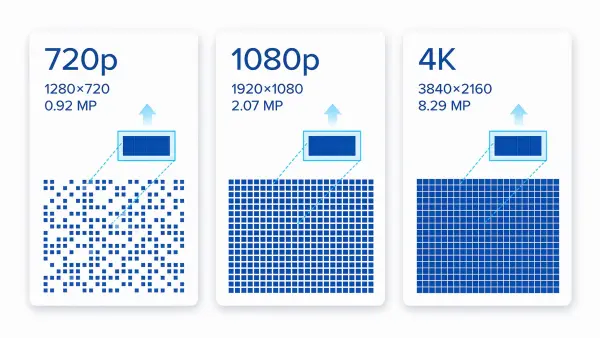
So calling it HD is correct. It is just the entry level, and marketing copy tends to leave that bit out.
What Content Costs You at 720p vs 1080p
Most articles comparing these two resolutions quote generic consumer streaming figures, which do not help much when you are specifying hardware for a network of players. The table below uses our own standard encode settings — H.264 High profile, 30 fps, 8-bit, target average bitrate — the ones we use when we prepare playback loops for our boards and signage panels.
| Content target | Native pixels | Our standard encode | File size per minute |
|---|---|---|---|
| 720p | 1280 × 720 | 2.5 Mbps | ~19 MB |
| 1080p | 1920 × 1080 | 6 Mbps | ~45 MB |
| 4K UHD | 3840 × 2160 | 20 Mbps | ~150 MB |
| Shelf-edge bar, 23.1" | 1920 × 158 | 1 Mbps | ~7.5 MB |
| Transit bar, 48.0" | 3840 × 720 | 8 Mbps | ~60 MB |
Treat these as example settings, not as what your network will measure. File size is bitrate × duration plus container and audio overhead, so the arithmetic is exact — but the bitrate needed for acceptable quality is not. It moves with:
- Content — a slow talking-head loop encodes far smaller than fast-cut footage with fine detail, at the same nominal setting.
- Codec and profile — H.265/HEVC or AV1 typically reach comparable quality at roughly half the bitrate of H.264; the table is H.264.
- Encoder, GOP length and rate control — two encoders at "6 Mbps" will not produce the same picture.
- Frame rate and bit depth — 60 fps or 10-bit content needs more bits for the same perceived quality.
Use the table to size the comparison between resolutions, then validate the actual number with a test encode of your own content before committing to a data plan.
Those last two rows are worth a closer look, because they break the assumption people usually make about small screens. Our stretched bar displays do not follow a 16:9 ladder at all:
- The 23.1" shelf-edge bar runs 1920 × 158, which is only 303,360 pixels, about a third of 720p. Cheap to feed, and nobody has ever complained about bandwidth on a pricing rail.
- The 48.0" transit bar runs 3840 × 720, which is 2,764,800 pixels. That is more pixels than a 1080p screen (1.33×) and three times 720p.
So "it's just a narrow bar" is not a reason to spec it down. Get that wrong and you get a video wall's worth of data going through what you budgeted as a small display. We wrote about this in more detail in the stretched bar buyer's guide.
On the hardware side, decoding is rarely the bottleneck any more. The Android boards in our all-in-one LCD displays handle 1080p and higher without complaint, as do the external X86 players we ship. The thing that actually limits you is the uplink, which brings us to the failure mode we get called about most.
Why Loops Still Drop to 720p Mid-Playback
Adaptive bitrate. If you have ever watched a stream go soft for a few seconds and then recover, that is the player switching down to keep the video moving. On a signage network this produces a genuinely annoying problem: a 1080p schedule that looks flawless in your office silently degrades to something closer to 720p on the screens that sit on weak Wi-Fi or a congested SIM connection, and nobody notices until a client photographs it.
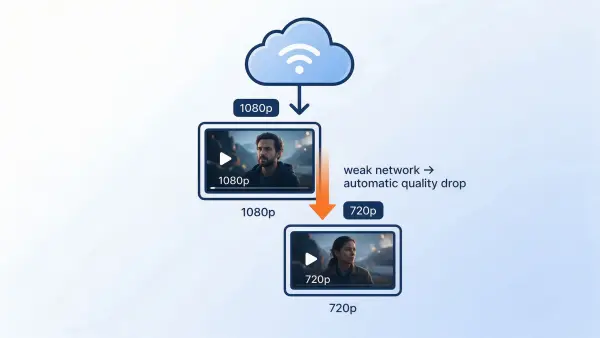
Two practical points from troubleshooting these calls:
- A 1080p file cannot be rescued by a weak link. If the uplink cannot sustain roughly double the bitrate of the 720p version, either fix the network or author the content at 720p deliberately. Deliberate looks fine; accidental looks broken.
- Local playback sidesteps the whole issue. With a USB stick or an onboard media player, the limit is the decoder and the storage read speed, not the internet. Most of our signage units ship with a built-in Android or X86 player you can load offline, which is why we push buyers toward it when their site connectivity is uncertain.
Screen Size and Viewing Distance: The Rule We Actually Use
Pixel count on its own tells you very little. What decides whether 720p is acceptable is pixel pitch, which is a function of resolution and physical size. Engineers are used to thinking in pixels per inch (PPI); procurement usually finds it easier in metres of viewing distance. Below are both, calculated for real sizes from our own signage range rather than hypothetical panel sizes.
First, PPI at each of our standard digital signage sizes:
| Screen size | At 1080p | At 720p |
|---|---|---|
| 21.5" | 102 PPI | 68 PPI |
| 24" | 92 PPI | 61 PPI |
| 32" | 69 PPI | 46 PPI |
| 42" | 52 PPI | 35 PPI |
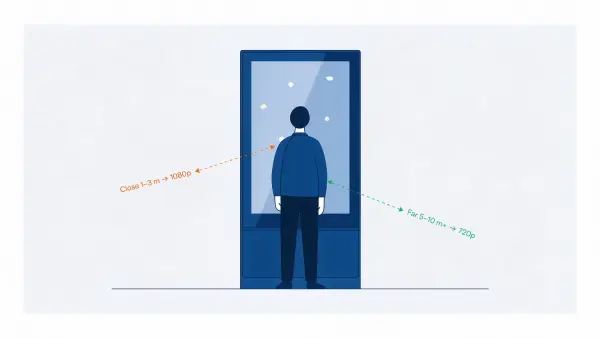
And here is the useful bit. For someone with normal corrected vision (roughly one arcminute of acuity), the pixel grid stops being visible once you get far enough back. Converting that to distance gives:
| Screen size | Pixels invisible beyond, at 1080p | Pixels invisible beyond, at 720p |
|---|---|---|
| 21.5" | ~0.9 m | ~1.3 m |
| 24" | ~1.0 m | ~1.4 m |
| 32" | ~1.3 m | ~1.9 m |
| 42" | ~1.7 m | ~2.5 m |
What those numbers assume. They are calculated, not measured on viewers, and every one of these inputs is baked in: a 16:9 panel at the stated diagonal; straight-on viewing at screen centre; normal corrected vision of about one arcminute; static content whose smallest text renders at roughly 20 pixels of cap height or more; and adequate contrast, meaning no glare washing the panel out.
Change any input and the distance moves:
- Off-axis viewing degrades perceived sharpness well before the acuity limit, so a screen mounted high or beside a walkway behaves worse than the table suggests.
- Smaller text pushes the required distance out, because legibility fails before the pixel grid does.
- Better-than-average acuity, or a viewer who steps closer than the layout anticipates, moves it out too.
- Reflections and glare can make a pixel structure visible again at any distance — a readability problem, not a resolution one.
So read the table as a planning reference for one set of conditions, not a universal threshold. If your audience can get closer than the number in the column, that resolution is likely to look soft to them. A 32" 1080p menu board is typically fine past 1.3 m, which covers almost every queue-line installation. Put the same 32" 720p panel in that queue and viewers would need to stand nearly two metres back before it stops looking grainy, so anybody at the counter is likely to see the compromise.
This is the same arithmetic behind the line in our selection guide that 4K starts paying for itself under about 2 m. It is arithmetic with stated inputs, not a rule of taste — and the 2 m planning figure is deliberately more conservative than the strict acuity number, because in lobbies and shop windows people do drift up to the glass.
The Rule Acuity Charts Don't Cover
Distance math tells you when the pixel grid disappears. It says nothing about whether your content reads. We have seen plenty of 1080p installations that are technically sharp and still unreadable, because someone put 12-point body copy and a QR code in a poster designed for print.
The check we ask clients to run before we quote: open the artwork at native resolution and look at the smallest text element. If capital letters come out under roughly 20 pixels tall, that text is at risk — how much risk depends on viewing distance, contrast, font weight and whether anyone can step closer, and it is not fixed by raising the panel resolution on its own. The usual fixes are fewer words, larger type, or moving that line off screen entirely. This comes up constantly on menu boards and wayfinding screens, and we cover legibility alongside brightness in our sunlight readable display guide, since glare and small type fail together.
Where 720p Still Earns Its Place
To be clear about this: 720p is not dead, and we still quote it. Whether it is the right call depends on four things — the interface task, the smallest text or detail in the artwork, the viewing distance, and the budget — rather than on the resolution label alone. In our experience it tends to be the right call when the following hold:
- Viewers stay well back. Roadside boards, warehouse aisle-end signs, high-mounted transit displays, and anything seen mainly from across a concourse.
- The message is simple. One line of text, a single price, an arrow, a zone indicator. No paragraphs, no tables, no QR codes — because those are the elements that fail first at 720p.
- The artwork survives the density. If the smallest element still renders clearly at the pixel pitch of your size, 720p is not costing you anything a viewer would notice.
- It is a cost-driven or retrofit project. Existing hardware already runs 720p, the content library is already authored that way, and nothing on the site is going to change that next year. Saving on the panel, the player and the uplink can be the difference between a viable rollout and none at all — that is a legitimate reason to stay at 720p.
Where budget is the binding constraint, the usual compromise is to spend the saving on brightness, enclosure rating or thermal headroom, which tend to affect whether a screen is usable at all more than extra pixels do.
Two of those situations show up in our own catalogue. The large size digital signage display line is specified at 1920×1080 or 3840×2160 for retail, menu boards and lobbies, precisely because those are close-viewing jobs. Our transit work is the opposite: panels go above a bus windshield where passengers sit two to six metres away, and budget is better spent on brightness and vibration survival than on pixels. There is a clear account of how that trade-off plays out in practice in our high brightness buying guide.
The opposite cases — where 720p most often leads to complaints, and where we would usually recommend 1080p instead:
- Anything touch-driven, because people lean in. The deciding factor is the size of the touch targets and the smallest on-screen text, not the diagonal.
- Retail window and menu boards, where the whole point is price or promotion text.
- Brand advertising, where a soft logo tends to reflect worse on the brand than no screen at all. We have written separately about this from the retailer's side in how retailers use bar LCD displays.
- Elevator, lift lobby and vestibule screens, where viewers typically stand about a metre away and read while waiting. There is no distance to hide behind.
Even in these cases, resolution is one input rather than a rule: if an existing 720p content library or a hard budget cap makes 1080p impractical, enlarging the type and simplifying the layout usually recovers more readability than the panel upgrade would.
720p vs 4K: Don't Skip the Middle Step
4K UHD carries about 8.29 million pixels, nine times 720p. On a large panel at close range the jump is obvious in a way nobody needs to be told twice. The one thing worth saying here is about sequencing: in our experience, going straight from 720p to 4K is usually the weakest of the three moves, because the visible-per-dollar jump from 720p to 1080p is far larger than the one from 1080p to 4K on anything past arm's length. Our own positioning reflects that — 1080p is standard across the signage range, with 4K offered where the geometry genuinely justifies it, such as premium lobby video walls and outdoor high brightness installations on 32" and larger.
The full cost comparison — panel price, player capability, bandwidth per screen per day, and when 4K content actually has to be authored at 4K — is its own subject, and it is covered in UHD vs HD: 4K and 1080p Compared for Commercial Displays. This article stays on the question of what 720p is and when it is enough.
Two Projects That Show Both Sides
Theory is fine, but these two shipped projects make the point better than any table. Both are real AplusLCD builds.
Where 720p Would Have Shown Immediately: A 15.6" Outdoor Kiosk
A Ukrainian client came to us with self-service kiosks standing in direct sunlight. In summer the displays repeatedly went black, because the panels were overheating under solar load and failing mid-transaction, at exactly the moment a shopper needed them.
The headline problem was thermal, not resolution. But resolution came into the specification anyway, because of where users stand at a kiosk: close enough to touch it. A 15.6" panel running 1920×1080 gives about 141 PPI. Drop that same panel to 720p and you get roughly 94 PPI, which at arm's length puts visible structure all through a UI built from icons, small numerals and confirmation prompts.
We specified a 15.6" industrial high-TNI LCD at 1000 nits and 1920×1080, rated -30°C to 80°C, then reworked the thermal side around it with an aluminium heatsink, airflow channels and a low-power backlight driver. Per the project record, blackout incidents stopped across the deployed fleet and the units run 24/7 outdoors; full write-up on the self-service kiosk case study, which is the source for those figures.
The transferable lesson: on a screen people touch, resolution has to hold up at roughly half a metre — and what sets that bar is the size of the touch targets and the smallest text in the UI, not the diagonal. A kiosk built from large icons and short prompts tolerates a lower density better than one built from small numerals and confirmation copy.
Where the Aperture Set the Spec: A 42.9" Bus Display
A French client needed in-vehicle displays for Korean buses. The mounting space above the windshield measured 1100 × 225 mm, a long narrow aperture that ruled out every standard monitor available.
Note what was not driving the decision. Passengers sit two to six metres back, so the pixel density requirement was modest. The hard constraints were the physical opening, constant vibration, daily temperature swings, and running straight off the vehicle's 24 V system. We custom-built a 42.9" stretched LCD with a 1098.8 × 225 mm outline, leaving clearance for vibration and thermal expansion, added a shock-tested enclosure and a wide-temperature panel, and fitted a customized DC 24 V interface so no external inverter was needed.
Per the project record, passengers found the displays clearly readable even in bright daylight and the client expanded the advertising schedule across the fleet. Details on the transportation case study, which is the source for that account.
Put the two side by side and the pattern is obvious. Same factory, same year, two projects that landed on completely different answers to "how many pixels do we need" — because the viewing distance and the mounting geometry were different, not because one client cared more about quality.
FAQ
Is 720p considered HD?
Yes. 1280 × 720 is the minimum qualification for High Definition. It is HD, it is simply the entry tier rather than Full HD.
Is 720p good enough for digital signage?
Often, yes — for distant outdoor screens, simple text boards, transit displays and cost-constrained rollouts. Once viewers can get inside about two metres, or the content carries prices, QR codes or small print, we would usually move to 1080p. Where an existing content library or a hard budget cap rules that out, enlarging the type and simplifying the layout is the next best move. Our digital signage selection guide lists the full set of parameters, including where 4K earns its premium.
Can people actually see the difference between 720p and 1080p?
Depends entirely on size and distance. On a 32" panel viewed from 2 m, the difference is subtle to most observers. On the same panel from 1 m, or on any screen under about 22", 1080p reads noticeably cleaner. The tables above give the crossover distances.
Does 720p really use less bandwidth than 1080p?
Yes, and in our own encode settings it is substantial: 2.5 Mbps for 720p against 6 Mbps for 1080p, so roughly 19 MB vs 45 MB per minute of video. Those are example settings (H.264 High profile, 30 fps, 8-bit) — your own content, codec and encoder will move the figures — but the ratio between the two resolutions holds, and it is often the deciding factor on multi-site networks metered over cellular.
What does the "p" stand for?
Progressive scan: all lines drawn in order, one frame at a time. The "i" in older formats like 1080i means interlaced, where each frame was transmitted as two alternating fields.
Should we buy 4K instead?
Only when viewers are genuinely close to a large panel, or content is produced natively in 4K. Otherwise 1080p gives nearly all the perceived improvement for far less money, and the saving buys brightness, enclosure rating or thermal headroom, which tend to matter more outdoors. The cost and bandwidth comparison is set out in UHD vs HD.
What We Need From You to Answer This Properly
We would rather not tell you a resolution over the phone without seeing the site. In practice four details settle it almost every time:
- Screen size you are considering, or the cut-out dimensions you are constrained by.
- Typical viewing distance, and whether anyone can get closer than that.
- The smallest text or detail in your artwork, at its native size.
- Where it points —indoors, behind shop glass, or into direct sun.
Send those to our sales team at [email protected] or through the contact page, and you will have a recommendation with pricing, lead time and feasibility feedback within 24–48 hours. For reference: no MOQ for standard products; MOQ 3 pcs for custom products, business project evaluation is available, standard orders ship in 7–10 working days and samples in 5–10 days, while custom OEM/ODM builds run 4–8 weeks from approved specification.
If you already know your audience will be reading up close, start with the large size digital signage display range — 1920×1080 or 3840×2160, 21.5" to 86", 250 to 800 nits, with a 24/7 rating and optional built-in Android or X86 player. Anything above 800 nits is served by our high brightness series rather than this range, so a sun-facing site is quoted from there. The 21.5" model suits shelf-edge and counter advertising, and the 32" is our usual recommendation for window-facing menu boards and lobby signage. Both are available as business project evaluation samples for evaluation before you commit to volume.